
Every lesson in this track ran one tool and asked one question. This one wires all of them into a single pipeline and runs it against the Range on every push — the thing you have been building toward, assembled.
The point is not that more tools are better. It is that each chapter's tool catches a class of flaw the others are blind to — the SAST lesson showed Semgrep missing the SQL injection, the DAST lesson showed ZAP missing the XSS — and a pipeline is how you cover all the classes at once, automatically, on work nobody remembered to check.
Verified. This is a real GitHub Actions workflow on the public Range repo. The run below is a real run; the screenshot is the actual Actions UI. Because the Range is deliberately vulnerable, a red pipeline is the correct result — most gates catching their planted flaw. Two gates pass, for reasons worth understanding, and Step 5 is about exactly that.
Step 1 — Six jobs, one per chapter
The whole pipeline is one file, .github/workflows/devsecops-pipeline.yml, with six independent jobs:
name: devsecops-pipeline
on: [push, pull_request, workflow_dispatch]

permissions:
  contents: read
  security-events: write   # SAST jobs write to the Security tab

jobs:
  secrets:     # gitleaks
  sast:        # Semgrep (auto rules + the repo-local sql.js taint rule)
  sca:         # Trivy filesystem scan
  iac:         # Checkov
  container:   # hadolint + Dockle + Trivy image
  dast:        # ZAP baseline against the running app
The jobs are independent, not sequential. That is the single most important design decision in the file. If they ran as steps in one job, the first failure would stop the rest and you would see only the first problem. As parallel jobs, every gate reports even when its neighbour fails — so one run tells you about secrets and SAST and the container, not just whichever broke first.
Step 2 — Secrets, SAST, SCA
  secrets:
    steps:
      - uses: actions/checkout@v4
        with: { fetch-depth: 0 }        # history — a deleted secret still counts
      - uses: gitleaks/gitleaks-action@v2
        env: { GITHUB_TOKEN: ${{ secrets.GITHUB_TOKEN }} }

  sast:
    container: { image: semgrep/semgrep }
    steps:
      - uses: actions/checkout@v4
      - run: semgrep scan --config=auto --config=.semgrep/ --sarif --output=semgrep.sarif --error app/
      - if: always()
        uses: github/codeql-action/upload-sarif@v3
        with: { sarif_file: semgrep.sarif, category: semgrep }

  sca:
    steps:
      - uses: actions/checkout@v4
      - uses: aquasecurity/trivy-action@0.28.0
        with:
          scan-type: fs
          scan-ref: app/
          severity: HIGH,CRITICAL
          ignore-unfixed: true          # a bug with no patch is not a task
          exit-code: 1
Three details carry the lessons of three chapters:
fetch-depth: 0on secrets, because a secret deleted in HEAD still lives in history. A shallow clone scans nothing.--config=.semgrep/on SAST loads the repo-local taint rule that catches thesql.jsinjection theautorules miss. Without it this gate walks past the SQL injection, exactly as the SAST lesson showed. The SARIF upload puts every finding in the Security tab.ignore-unfixed: trueon SCA, because a vulnerability with no patch is not a task, and blocking on one teaches people to bypass the gate.
Step 3 — IaC and the container
  iac:
    steps:
      - uses: actions/checkout@v4
      - uses: bridgecrewio/checkov-action@v12
        with: { directory: terraform/, soft_fail: false }

  container:
    steps:
      - uses: actions/checkout@v4
      - id: hadolint
        continue-on-error: true
        uses: hadolint/hadolint-action@v3.1.0
        with: { dockerfile: docker/Dockerfile }
      - run: docker build -f docker/Dockerfile -t range-app:ci .
      - id: dockle
        continue-on-error: true
        run: docker run --rm -v /var/run/docker.sock:/var/run/docker.sock goodwithtech/dockle:v0.4.15 --exit-code 1 --exit-level fatal range-app:ci
      - id: trivyimage
        continue-on-error: true
        uses: aquasecurity/trivy-action@0.28.0
        with: { image-ref: range-app:ci, severity: HIGH,CRITICAL, ignore-unfixed: true, exit-code: 1 }
      - run: |     # fail the job if ANY of the three flagged
          [ "${{ steps.hadolint.outcome }}" = failure ] || \
          [ "${{ steps.dockle.outcome }}" = failure ] || \
          [ "${{ steps.trivyimage.outcome }}" = failure ] && exit 1 || true
Checkov owns the IaC gate — it caught the wildcard IAM policy that Trivy's config scanner has no rule for.
The container job shows a pattern worth stealing: three checks, continue-on-error on each, then one step that fails the job if any of them did. hadolint reads the Dockerfile, Dockle reads the built image (and finds the credentials baked into a layer), Trivy scans its packages. Running them as plain sequential steps would stop at the first failure; continue-on-error plus a final gate lets all three report and then blocks.
Step 4 — DAST, and the fast/slow split
  dast:
    steps:
      - uses: actions/checkout@v4
      - run: |
          docker build -f docker/Dockerfile -t range-app:ci .
          docker run -d --name range -p 3000:3000 range-app:ci
          for i in $(seq 1 20); do curl -sf http://localhost:3000/health && break; sleep 2; done
      - run: |
          docker run --rm --network host ghcr.io/zaproxy/zaproxy:stable \
            zap-baseline.py -t http://localhost:3000 -I
      - if: always()
        run: docker rm -f range || true
This is the passive baseline — it belongs on every push because it is fast and sends no attacks. The DAST lesson established the rest of the rule: the active scan and Nuclei's templated checks belong on a schedule, not a pull-request gate, because an active scan is slow and is literally an attack. In a real pipeline that is a second workflow on schedule:; here the baseline is the one that runs on every push.
Note -I: the baseline reports and does not block. That is deliberate and it matches the finding from the DAST chapter — the baseline shows zero failures on an app with a working SQL injection. A passive scan is a smoke alarm, not a gate.
Step 5 — The run
One push, six jobs, five minutes. Here is the actual result:
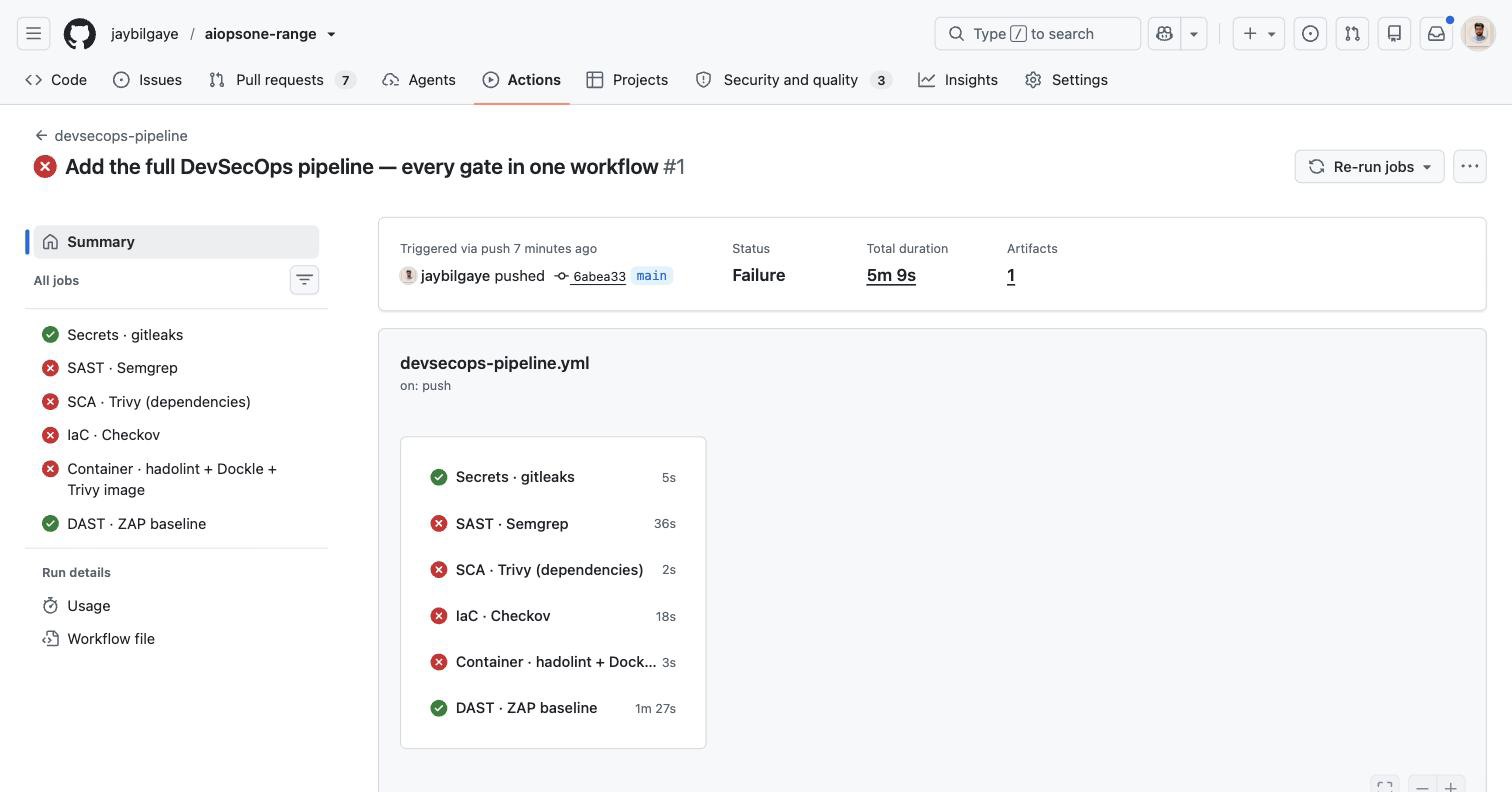
OVERALL: Failure  (5m 9s)

  ✅ Secrets · gitleaks                              5s
  ❌ SAST · Semgrep                                 36s
  ❌ SCA · Trivy (dependencies)                      2s
  ❌ IaC · Checkov                                  18s
  ❌ Container · hadolint + Dockle + Trivy image     3s
  ✅ DAST · ZAP baseline                          1m 27s
Four gates fired, the run is red, and the app does not ship. That is the pipeline working. But the two green jobs are the more instructive part, because neither green means "nothing was wrong" — and reading a pipeline correctly means knowing why a gate passed, not just that it did.
DAST is green because the baseline is passive. It ran with -I, so it reports and does not block, exactly as designed. The DAST lesson already showed this: the passive baseline finds zero failures on an app with a working SQL injection. A green baseline is not a clean bill of health — it is a smoke alarm that did not go off, on a fire it cannot see. The active scan that would catch the injection runs on a schedule, not this gate.
Secrets is green for a subtler reason, and it is the most important lesson in this run. The gitleaks job logged:
INF 1 commits scanned.
INF no leaks found
✅ No leaks detected
One commit. gitleaks-action on a push scans the diff of that push, not the whole repository — and this push added the workflow file, not a secret. The Range's planted AWS key was committed long ago, so it is not in this push's diff, so the gate passes. That is correct behaviour for a pull-request gate: you block on secrets a change introduces, not on the entire history every time.
But it means the gate alone would never catch a secret already sitting in main. The history is covered by the other two things you have already seen: a scheduled full-history scan (the same principle as the TruffleHog lesson), and GitGuardian's historical scan, which found exactly this key and turned it into a tracked incident. The gate and the historical scan are two different jobs, and you need both. A pipeline that only runs the diff gate has a hole the shape of its own history.
This is the honest lesson of a real pipeline: green is not the same as safe. Two of six gates passed, and both had a reason worth understanding — one passive, one diff-scoped. A pipeline you cannot read at this level is a wall of checkmarks you will eventually learn to trust blindly. Read what each gate actually scanned.
Step 6 — What blocks a merge, and what merely reports
The pipeline above makes a specific set of choices, and they are the choices worth arguing about:
| Gate | On a pull request | Why |
|---|---|---|
| Secrets (gitleaks) | block | A committed live credential is the highest-severity, lowest-false-positive finding there is. |
| SAST (Semgrep + rule) | block on ERROR | Your own injection bugs, with your own sink rules. Tuned, this is a hard gate. |
SCA (Trivy, --ignore-unfixed) |
block HIGH/CRIT | Only fixable findings, or the gate gets bypassed. |
| IaC (Checkov) | block | Misconfigured infrastructure is cheap to catch here and expensive in production. |
| Container (Dockle fatal, Trivy) | block on FATAL/HIGH | Secrets in a layer and known CVEs; base-image noise stays non-blocking. |
| DAST baseline | report | Passive, fast, informational. The active scan runs on a schedule and never gates. |
The principle underneath the table: block on findings that are specific, actionable, and low-false-positive; report everything else. A gate that fires on things people cannot fix, or that fires wrongly, gets switched off — and a switched-off gate is worth less than no gate, because it looks like coverage.
Step 7 — The pipeline is the audit evidence
This is the part that matters for an APRA CPS 234 conversation, and it is the through-line of the whole track. Every job here produces a durable artefact:
- The SAST job uploads SARIF to the Security tab, so findings have a state, an owner, and a history — the durable record an assessor asks for.
- Every run is timestamped and attributed in the Actions log: this commit, this author, these gates, this result.
- CodeQL and Dependabot run alongside as their own GitHub-native workflows, adding continuous SAST and dependency remediation.
"We scan our code" is a claim. "Here is every gate that ran on every commit this quarter, what each found, and when it was remediated" is evidence. The pipeline is what turns the first sentence into the second — and that, not the tool count, is the reason to build it.
What you learned
- Six gates, one workflow, independent jobs — so every gate reports on one run instead of stopping at the first failure.
- Against a deliberately vulnerable app, a red pipeline is the pipeline working. Four of six gates fired; the run was red in five minutes.
- Green is not safe. DAST passed because the baseline is passive; Secrets passed because
gitleaks-actionscans the push diff (one commit), not history. Read what each gate actually scanned. - The details carry the lessons:
fetch-depth: 0for history,.semgrep/for the sink rule that catches the SQLi,--ignore-unfixedso the gate stays passable. - The
continue-on-error+ final-gate pattern lets a multi-check job (hadolint, Dockle, Trivy) report everything and then block. - Baseline DAST on every push (report), active DAST on a schedule (never gates). A passive scan is a smoke alarm.
- Block on specific, actionable, low-false-positive findings; report the rest. A bypassed gate is worse than none.
- The pipeline's output is your audit evidence — SARIF in the Security tab, timestamped runs, per-commit attribution. That is the CPS 234 artefact, and the real reason to build the whole thing.