
Every secrets tool in this chapter so far has answered a question about one repository: is there a secret in these files, in this history, in this commit. That is the right question when you own one repo.
It is the wrong question when you own two hundred. At that scale the useful questions change shape: is this the same credential we already found somewhere else? does it still work? who owns the repo it is in? has anyone acted on it? Those are not properties of a file. They are properties of a credential, tracked across everything you own.
That shift — from finding to incident — is what a platform sells, and it is worth understanding before you decide whether you need one.
Verified against ggshield 1.53.0 (secrets engine 2.169.1), scanning the Range. Output copied from a real run.
Step 1 — Install and authenticate
ggshield is the GitGuardian CLI. It is a client: detection runs server-side, which is the first real difference from gitleaks.
brew install gitguardian/tap/ggshield
ggshield auth login
If brew install fails on a Python link conflict — it may, since ggshield is a Python package — use pipx instead, which gives it an isolated interpreter:
brew install pipx && pipx ensurepath
pipx install ggshield
ggshield auth login
ggshield auth login opens a browser and writes the token to your system keyring. Do not paste an API token into a terminal you are recording, and do not export it into your shell history — the login flow exists precisely so you never handle the token yourself.
Confirm what you are connected to before you scan anything:
ggshield api-statusAPI URL: https://dashboard.gitguardian.com
Workspace ID: 266446
Status: healthy
App version: v2.602.0
Secrets engine version: 2.169.1
Token scopes: scan, honeytokens:check
API key source: keyringToken scopes: scan is the line to read. This token can submit content for scanning and nothing else — it cannot read your incidents, change policy, or manage members. A CI token should look exactly like this. A token with more scopes than the job needs is a credential-handling problem inside your credential-scanning tool.
Step 2 — Scan the Range
git clone https://github.com/jaybilgaye/aiopsone-range
cd aiopsone-range

ggshield secret scan path -r .
It prompts before scanning, because it is about to send file content to a remote API:
21 files will be scanned. Do you want to continue? [y/N]:That prompt is not in your way — it is the tool telling you what it is. Read the section on that below before you point this at a private repository.
> app/server.js: 1 secret detected

>> Secret detected: AWS Keys
   Validity: Invalid
   Occurrences: 1
   Known by GitGuardian dashboard: NO
   Secret SHA: 66f7db9c3db7647bd8481b37eff76624cbb01fbb1bb80d45f46866e208a2b0f4

25 | const AWS_ACCESS_KEY_ID = 'AKIA************8TLM';
                                |_____client_id____|
26 | const AWS_SECRET_ACCESS_KEY = 'kR8fT2w**************************9iO2pWn';
                                    |_____________client_secret____________|

> docker/Dockerfile: 1 secret detected

>> Secret detected: AWS Keys
   Validity: Invalid
   Occurrences: 1
   Known by GitGuardian dashboard: NO
   Secret SHA: 66f7db9c3db7647bd8481b37eff76624cbb01fbb1bb80d45f46866e208a2b0f4

23 | ENV AWS_ACCESS_KEY_ID=AKIA************8TLM
                           |_____client_id____|
24 | ENV AWS_SECRET_ACCESS_KEY=kR8fT2w**************************9iO2pWn
                               |_____________client_secret____________|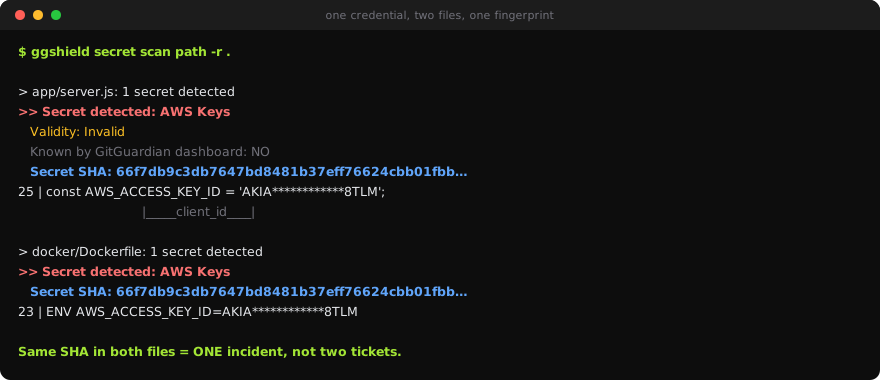
Step 3 — Read the four lines that are not in gitleaks
Everything interesting is in the metadata block, not the match.
Secret SHA is identical in both files. 66f7db9c… in server.js, 66f7db9c… in the Dockerfile. That is a fingerprint of the credential, not of the line, the file, or the commit. Two files, one secret.
This is the whole org story in one field. Gitleaks and TruffleHog each reported these as two findings, because from a per-file perspective they are two findings. GitGuardian reports one credential observed in two places — so it becomes one incident with two occurrences, not two tickets for one rotation. Multiply by a shared deploy key pasted into forty repos and the difference is forty tickets versus one.
Validity: Invalid means it tried the credential against AWS. A live key and a long-dead one are the same regex match and completely different incidents, and validity is what sorts a queue of two thousand findings into the handful that are currently exploitable. TruffleHog does this too — it is the single most valuable signal either tool produces.
Occurrences: 1 is per-file; the dashboard aggregates them across the org.
Known by GitGuardian dashboard: NO means this is new. On a second scan it would say YES and carry an incident URL, a status and an assignee. That is the state a per-repo scanner cannot hold: we have seen this, Priya owns it, it was triaged Tuesday.
Notice what it linked. The AKIA… ID and the 40-character secret are reported as one finding with a labelled client_id and client_secret, not two. An access key ID on its own is not a credential; the pair is. Tools that report them separately double-count every AWS finding you have.
Step 4 — What it did not flag
Two lines below the AWS key in the same file:
const DB_PASSWORD = 'hunter2';
const JWT_SIGNING_KEY = 'dev-secret-do-not-use';
Neither was reported. Both are hardcoded credentials, and a human reviewing this file would flag both.
They are not detected because they are not shaped like anything. AKIA… plus 40 base64 characters is a structure worth a detector; hunter2 is a word. High-confidence detectors are what make validity checking and low false-positive rates possible, and the cost is that generic secrets fall straight through.
This is the same lesson as every other chapter, in a new place. Semgrep missed the SQL injection, the community Nuclei templates missed the debug endpoint, and GitGuardian misses
hunter2. A scanner finds what somebody wrote a detector for. Nothing in this track changes that; what changes is whether you know where the edge is.
Generic-secret detection exists in the platform's policy settings and it trades directly against false positives, which is why it is off by default.
Step 5 — The transmission question
The prompt in Step 2 was real: ggshield sends file content to GitGuardian's API. Detection is a hosted service. That is the trade the platform makes — server-side detectors improve without you upgrading anything, and validity checking requires a service that can talk to AWS.
Before pointing it at a private repository, know three things:
- What leaves the machine. File contents of what you scan. There is a self-hosted option for organisations that cannot allow that; it is an enterprise arrangement.
- What it skips, and why. From this run:
Skipped .git/index: can't detect encoding
Skipped terraform-provider-aws_v5.100.0_x5: content is over 1,048,576 bytes
The 1 MB cap is the one to remember. Provider binaries, bundled assets, minified vendor files and model weights are silently over it. A secret in a large generated file is a real thing that happens, and this tool will not see it.
- What it costs. Scanning consumes API quota:
ggshield quotaQuota available: 9999
Quota used in the last 30 days: 1
Total Quota of the workspace: 10000 10,000 calls a month on this workspace. Comfortable for pre-commit and pull requests; a monorepo re-scanned on every push will find the ceiling. Check quota before rolling out to CI, not after the job starts failing.
Step 6 — Gate it
The pre-commit hook is one command, and it does the same job as the gitleaks hook:
ggshield install -m local -t pre-commitIn CI, scan the commit range rather than the tree — you want what this change introduced, not what the repository has always contained:
# .github/workflows/secrets.yml
name: secrets
on: [pull_request]

permissions:
  contents: read

jobs:
  ggshield:
    runs-on: ubuntu-latest
    steps:
      - uses: actions/checkout@v4
        with:
          fetch-depth: 0          # ci mode needs history

      - uses: GitGuardian/ggshield-action@v1
        env:
          GITGUARDIAN_API_KEY: ${{ secrets.GITGUARDIAN_API_KEY }}
fetch-depth: 0 matters for the same reason it did in the TruffleHog lesson: a shallow clone has no history, and a tool that scans a commit range against no history scans nothing and exits zero.
One flag worth knowing before you need it: the local CLI has --exit-zero, not --exit-code. It fails the build by default and you opt out — the opposite of Trivy and Nuclei, where you opt in. A --exit-code 1 copied from another tool's docs fails with No such option rather than doing what you meant.
Step 7 — Decide whether you need this
You have now run three secrets tools against the identical repository:
| gitleaks | TruffleHog | ggshield | |
|---|---|---|---|
| Findings on the Range | 2 | 2 (AWS detector) | 1 secret, 2 occurrences |
| Runs offline | yes | yes | no — hosted API |
| Checks the key still works | no | yes | yes |
| Stable cross-repo fingerprint | no | no | yes (Secret SHA) |
| Incident state, owner, history | no | no | yes |
| Cost | free | free | free tier, then per developer |
One repository: use gitleaks. It is free, offline, fast, and finds these same secrets. Nothing above justifies a platform for a single codebase.
Many repositories and a team that has to answer for them: the fingerprint and the incident state are the product, and they are genuinely hard to rebuild. The question is never "is GitGuardian better than gitleaks" — it is whether you have enough repositories that the same finding arriving twice has become your actual problem. Below that threshold you are paying for an answer to a question you do not have.
For an APRA CPS 234 conversation specifically, the artefact that matters is not the scan — it is being able to show a credential was detected, assessed for validity, assigned, and rotated, with dates. That is an incident record. A per-repo scanner produces console output.
Here is what that record looks like once the Range is a monitored source and GitGuardian has scanned it:
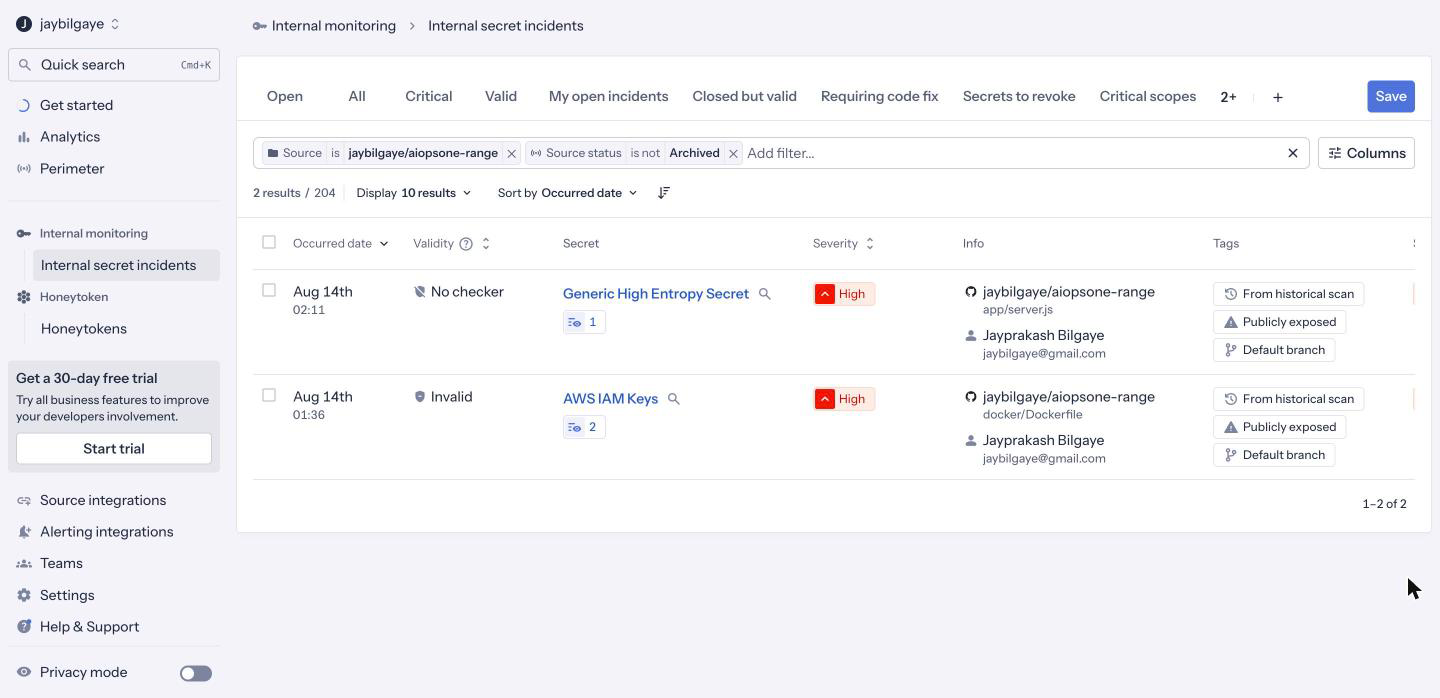
Every column here is something the terminal cannot give you. The AWS IAM Keys incident is marked Invalid — validity checked against AWS — and folds the key's two occurrences into a single incident. Both are tagged Publicly exposed and From historical scan, and each is attributed to the committer. This is the durable, owned, queryable state a ggshield secret scan in CI does not retain: not "a scanner found something", but "this credential, this severity, this owner, exposed publicly, still open". That is the artefact an assessor asks for, and it is the thing you are actually buying.
What you learned
- The same
Secret SHAin two files is the org-scale feature: one credential, two occurrences, one incident — not two tickets. Validity: Invalidmeans the key was tested against AWS. Live versus dead is what makes a large queue triageable.- ggshield links the key ID and secret as one finding, with labelled
client_idandclient_secret. Tools that split them double-count. - It misses
hunter2anddev-secret-do-not-use— high-confidence detectors are why validity checking works, and generic secrets are the price. - It sends file content to a hosted API, skips files over 1 MB, and consumes quota (
ggshield quota— 10,000/month here). Know all three before pointing it at a private repo. --exit-zero, not--exit-code. It fails by default; you opt out.- One repo: gitleaks. Many repos and an audit obligation: the incident record is the thing you cannot rebuild yourself.