
Most advice about leaked credentials is "scan your repository for secrets." That finds the keys you have already leaked. By the time a secret is in a commit object it is in the reflog, in every clone, and in every fork — and the only real remedy is rotation, not deletion.
The scan worth running is the one that happens before the commit exists. That is a pre-commit hook, and it takes about ten minutes to set up.
One caveat up front, because this is the trap: a pre-commit hook alone is not a control. Anyone can bypass it with --no-verify, and CI runners never run it at all. Steps 1–3 stop you from making an honest mistake. Step 5 is the part an auditor would accept.
Everything below was run against gitleaks 8.30.1. Every command and every output is copied from a real terminal, not written from memory. Where the tool behaved differently from what the documentation implies, that is called out rather than smoothed over.
What you'll build
you type git commit
   │
   ├─ pre-commit hook runs gitleaks on STAGED changes only
   │     └─ finding? commit is refused, nothing enters history
   │
   └─ clean? commit proceeds
              │
              └─ CI re-runs the same rules on the push
                    └─ catches --no-verify and anyone without the hook
Two enforcement points, one rule set. Local for speed, CI for authority.
Step 1 — Install Gitleaks
brew install gitleaks          # macOS
gitleaks version               # confirm before continuing
Gitleaks is a single Go binary with no runtime dependencies, which is why it works well as a hook — it adds well under a second to a commit.
The command names changed. Older guides use gitleaks detect (history) and gitleaks protect --staged (uncommitted). The current commands are:
| Use | Command |
|---|---|
| Scan a git repository, including history | gitleaks git . |
| Scan only what is staged — what a hook runs | gitleaks git --staged |
| Scan a directory or single file, ignoring git | gitleaks dir . |
detect and protect still function in 8.30.1 but no longer appear in gitleaks --help. Treat them as gone.
Step 2 — Plant a secret to test against
Here is where nearly every tutorial on this subject is wrong, including the first draft of this one.
The obvious fixture is AWS's published example key. It is inert, it is documented, and it has the right shape:
mkdir secret-test && cd secret-test && git init

cat > config.js <<'EOF'
const AWS_ACCESS_KEY_ID = 'AKIAIOSFODNN7EXAMPLE';
const AWS_SECRET_ACCESS_KEY = 'wJalrXUtnFEMI/K7MDENG+bPxRfiCYEXAMPLEKEY';
EOF

git add config.js
gitleaks git --staged1:26AM INF 0 commits scanned.
1:26AM INF scanned ~155 bytes (155 bytes) in 108ms
1:26AM INF no leaks foundNo leaks found. Gitleaks allowlists AWS's example credentials by default. Build your lab on those and you get a green scan, a satisfying demo, and a scanner you have never once seen work.
It is stricter than it looks, too. The suppression keys off EXAMPLE appearing anywhere nearby, not just inside the matched string — a real-looking access key ID on one line and the example secret on the next still produces nothing.
Use fabricated high-entropy values instead:
cat > config.js <<'EOF'
const AWS_ACCESS_KEY_ID = 'AKIA3XZP7QK2WVNR8TLM';
const AWS_SECRET_ACCESS_KEY = 'kR8fT2wPmZ4vN7bXcQ1yJ6hL0sD3gA5eU9iO2pWn';
EOF

git add config.js
gitleaks git --staged -vFinding: const AWS_SECRET_ACCESS_KEY = 'kR8fT2wPmZ4vN7bXcQ1yJ6hL0sD3gA5eU9iO2pWn'
Secret: kR8fT2wPmZ4vN7bXcQ1yJ6hL0sD3gA5eU9iO2pWn
RuleID: generic-api-key
Entropy: 5.271928
File: config.js
Line: 2
Fingerprint: config.js:generic-api-key:2
1:28AM WRN leaks found: 1Note -v. Without it you get a count and nothing else — no file, no line, no rule.
Read that finding carefully
The rule that fired is generic-api-key, matching on entropy 5.27 — against the secret access key on line 2. The AKIA... access key ID on line 1 was not flagged at all. Tested on its own, in a file by itself, it produces no finding.
Two things follow, and neither is obvious:
Detection is driven by entropy, not by the AWS-shaped prefix. A 40-character random string next to a keyword is what trips the rule.
The variable name is part of the match. The same secret, renamed, behaves differently:
| Identifier | Result |
|---|---|
oops |
not detected |
apiKey |
detected |
api_key |
detected |
secret_token |
detected |
STRIPE_SECRET_KEY |
detected |
password |
detected |
generic-api-key needs a keyword and high entropy. A credential stored in a badly named variable walks straight past it. That is worth knowing before you tell anyone the repository is clean.
Step 3 — Wire it into pre-commit
Use the pre-commit framework rather than hand-editing .git/hooks/. Hand-written hooks live in a directory git does not clone, so they protect exactly one machine — yours.
# .pre-commit-config.yaml
repos:
  - repo: https://github.com/gitleaks/gitleaks
    rev: v8.30.1
    hooks:
      - id: gitleaks
Installing it:
brew install pre-commit    # see the note below before reaching for pip
pre-commit install
pip install pre-commitfails on current Python. Python 3.12+ and Homebrew Python are marked externally managed (PEP 668), so a plainpip installaborts witherror: externally-managed-environment. Usebrew install pre-commit,pipx install pre-commit, or a virtualenv. Do not reach for--break-system-packages.
Now try to commit the planted key:
git add config.js
git commit -m "add config"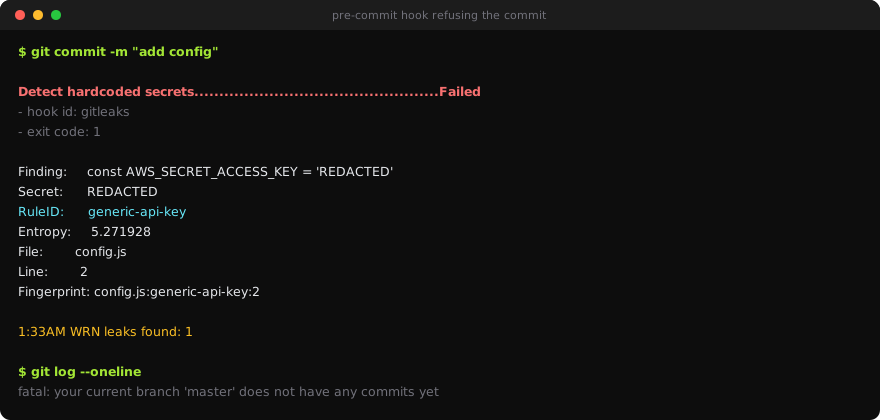
The commit is refused and git log confirms nothing entered history.
Two details worth noticing. The hook prints REDACTED instead of the secret — the raw CLI prints the value, the hook does not, which matters because CI logs are often more widely readable than the repository. And the first run is slow: pre-commit builds an isolated environment for the hook, printing Installing environment for.... Subsequent commits are effectively instant.
Why staged-only, and not the whole tree? The hook scans what you are about to commit, so it stays fast enough that you do not start resenting it. A hook that adds five seconds to every commit gets removed within a week, and a removed hook protects nothing.
Step 4 — The same secret is usually in more than one place
A three-line fixture proves the rule fires. It does not prepare you for a real repository, where one credential is duplicated across files nobody thinks of as "config".
The Range plants the same values twice on purpose — in app/server.js and in docker/Dockerfile:
gitleaks dir . -v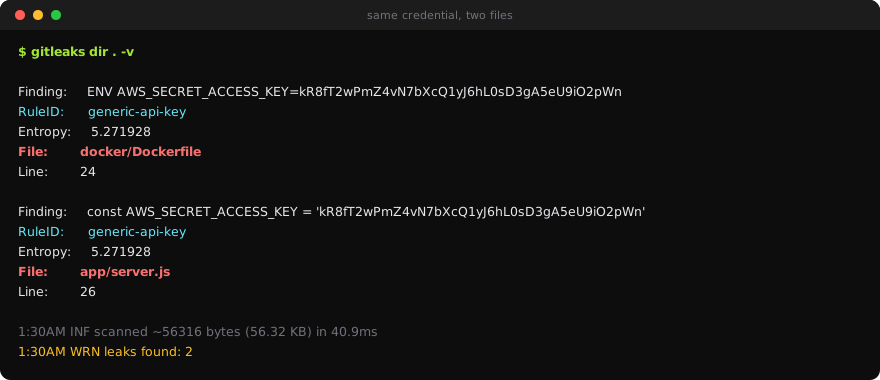
The Dockerfile copy is the interesting one. A secret in an ENV instruction is baked into an image layer, so it survives even if a later layer deletes the file, and docker history shows it to anyone who pulls the image. Gitleaks catches it here; the container chapter catches it again in the built image — two tools, same credential, two points in the pipeline.
That duplication is the actual lesson. Rotating a leaked credential means finding every copy, and the first one you find is rarely the only one.
Step 5 — When it is already committed
If the hook fires on something already in history, the order matters and most people get it backwards:
- Rotate the credential first. Immediately. Assume it is compromised — public repositories are scraped continuously, and the window is measured in seconds.
- Then decide about history. Rewriting with
git filter-repoor BFG changes every commit SHA after the touched commit, breaks open pull requests, and requires every collaborator to re-clone. - If the repo was ever public, or a fork exists, treat history rewriting as cosmetic. The key is out. Rotation is the only control that did anything.
The uncomfortable part. Deleting the secret and force-pushing feels like fixing it, which is exactly why it is dangerous — it produces the feeling of resolution without the substance. The commit still exists in forks, in GitHub's unreachable-object storage, and in anyone's local clone.
Step 6 — Gate it in CI
This is the step that turns a personal habit into an enforced control:
# .github/workflows/secrets.yml
name: secrets
on: [push, pull_request]

permissions:
  contents: read          # least privilege: this job only needs to read code

jobs:
  gitleaks:
    runs-on: ubuntu-latest
    steps:
      - uses: actions/checkout@v4
        with:
          fetch-depth: 0    # full history — a shallow clone scans almost nothing
      - uses: gitleaks/gitleaks-action@v2
        env:
          GITHUB_TOKEN: ${{ secrets.GITHUB_TOKEN }}
fetch-depth: 0 is the line people miss. The default checkout is shallow, so the scan sees one commit and passes cleanly while a secret sits three commits back.
Now --no-verify gets you a local commit and a failed pull request, which is the correct outcome: fast feedback locally, authority in CI.
Step 7 — Tune it, honestly
Every scanner produces false positives. The question is what you do about them — and this is where a scanner quietly stops working.
# .gitleaks.toml
[extend]
useDefault = true

[allowlist]
description = "Planted lab credentials - reviewed 2026-08-14"
paths = ['''app/server\.js''', '''docker/Dockerfile''']
Use the global
[allowlist]table. Writing a[[rules]]block with the sameidas a built-in replaces that rule rather than extending it. I did this while writing this lesson: the planted secrets went quiet, which looked like success, and so did a brand-new secret added afterwards. The rule had been deleted, not narrowed.
Prove the allowlist did not blind the scanner. Add a fresh secret somewhere it does not cover:
echo "const apiKey = 'Zt4hK9wR2mQ7xV5nB8cL3jF6sD0gA1eU4iO7pYnW';" > app/oops.js
gitleaks dir . -v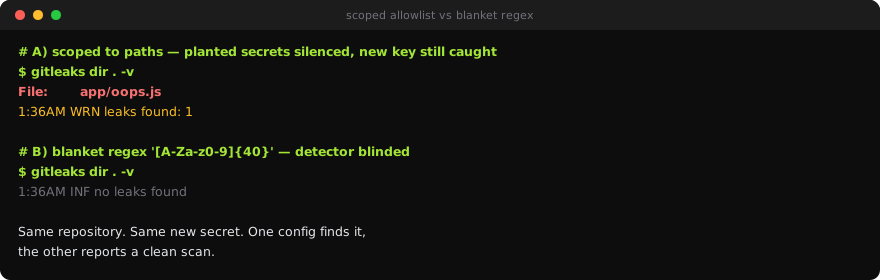
Same repository, same new secret. The path-scoped allowlist still catches it. The blanket regex reports a clean scan.
Two rules follow. Scope allowlists to a path or a specific rule, never a broad regex. And say why in the description — an unexplained allowlist entry is indistinguishable from someone hiding a real key, and that is precisely what an auditor will ask about.
What you learned
- A pre-commit hook stops the mistake; CI is what makes it a control, because
--no-verifyexists. - The obvious test fixture does not work. Gitleaks allowlists AWS's example credentials, so a lab built on them reports a clean scan forever. A scanner you have never seen produce a true positive is decoration.
- Detection here is entropy plus a keyword, not the
AKIAprefix. A secret in a variable calledoopsis invisible; the same secret inapiKeyis not. - One credential is usually in several files. In the Range it is in both the app source and the
Dockerfile, and rotation is not finished until you have found all of them. - Rotation comes before history rewriting. Always. Rewriting without rotating is theatre.
- Allowlist by path or rule, with a reason. A
[[rules]]block with a built-in id deletes the rule instead of narrowing it. fetch-depth: 0, or your CI scan is checking one commit and telling you everything is fine.