
The previous lesson stopped a secret from ever being committed. This one deals with the ones already in.
The instinct when you find a hardcoded key is to delete the line, commit, and feel better. That fixes the working tree and nothing else. Git keeps every version of every file it has ever seen — the old blob is still reachable, still in every clone, still in every fork, and still in the pack files GitHub serves.
A scanner pointed at your working tree will now report clean. That is the trap.
Verified against TruffleHog 3.96.0, scanning the Range. Every output below is copied from a real terminal.
Step 1 — Install TruffleHog
brew install trufflehog
trufflehog --version
Step 2 — Delete a secret and "fix" it
Take the Range, remove the hardcoded key from the source, and commit that as the fix:
git clone https://github.com/jaybilgaye/aiopsone-range
cd aiopsone-range

# the "fix": read from the environment instead of hardcoding
sed -i '' "s/const AWS_SECRET_ACCESS_KEY = '[^']*';/const AWS_SECRET_ACCESS_KEY = process.env.AWS_SECRET_ACCESS_KEY;/" app/server.js

git commit -am "remove hardcoded secret"
grep -c "kR8fT2wPmZ" app/server.js      # 0 — gone from the working tree
The file is clean. grep agrees. Now check whether that means anything.
Step 3 — Scan the working tree, then scan history
Gitleaks pointed at the directory scans what is on disk right now:
gitleaks dir .1:57AM WRN leaks found: 1One finding — and it is the other copy, the one still sitting in docker/Dockerfile. The deleted one is invisible, because on disk it no longer exists.
Now scan the commit history instead:
trufflehog git file://. --no-updateFound unverified result 🐷🔑❓
Detector Type: AWS
Decoder Type: PLAIN
Raw result: AKIA3XZP7QK2WVNR8TLM
Resource_type: Access key
Commit: 7a20995a281f61084edff6338212be26d57404b3
File: docker/Dockerfile
Line: 23
Found unverified result 🐷🔑❓
Detector Type: AWS
Raw result: AKIA3XZP7QK2WVNR8TLM
Commit: 7a20995a281f61084edff6338212be26d57404b3
File: app/server.js
Line: 25
finished scanning {"chunks": 15, "verified_secrets": 0, "unverified_secrets": 2}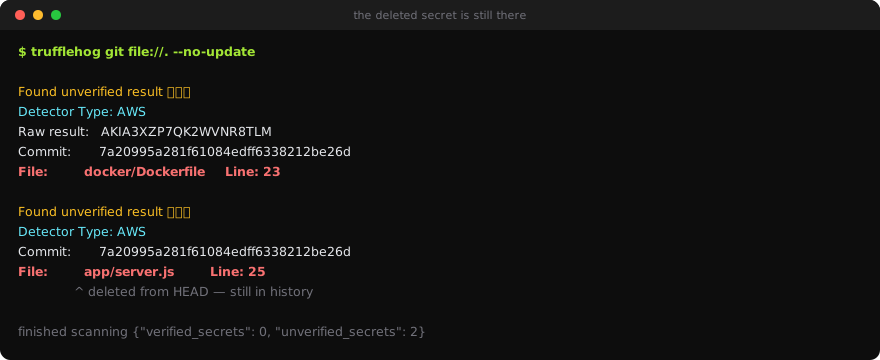
Two findings, and one of them is the file you just cleaned — reported against the commit where it still existed. The deletion did not remove anything; it added a commit on top.
Step 4 — Read what TruffleHog gives you that gitleaks does not
Three things in that output matter.
It names the commit. Commit: 7a20995a... is where the secret lives. That is what you hand to whoever is doing the history rewrite, and what tells you how far back the exposure goes.
It identified the detector as AWS, not a generic rule. The previous lesson found that gitleaks' default config flags the high-entropy secret key via generic-api-key and ignores the AKIA... access key ID entirely. TruffleHog has a purpose-built AWS detector and reports the access key ID directly. Two scanners, same repository, different findings — which is the argument for running more than one.
verified_secrets: 0 is a live credential check. TruffleHog attempted to authenticate to AWS with the key and it failed, so the result is unverified. Had that key been real and active, it would say Found verified result and verified_secrets: 1.
Verification is the feature worth understanding. A repository scan of any age produces dozens of findings, most of them dead — rotated years ago, or fake to begin with.
--results=verifiednarrows to the ones that still authenticate, which is the difference between a triage list of two hundred and a triage list of three. It also means the scan makes outbound authentication attempts, which some environments will not permit; check before running it inside a corporate network.
Step 5 — What to actually do about it
Order matters, and most people get it backwards:
- Rotate the credential. Now, before anything else. If TruffleHog says
verified, treat it as compromised — public repositories are scraped continuously and the window is measured in seconds. - Work out the exposure window. The commit timestamp tells you when it went in; whether the repo was ever public tells you who could have taken it. Both belong in an incident note.
- Only then consider rewriting history.
git filter-repoor BFG changes every commit SHA after the touched commit, breaks open pull requests, and forces every collaborator to re-clone. - If the repository was ever public, or a fork exists, rewriting is cosmetic. The blob is in GitHub's unreachable-object storage and in every clone. Rotation is the only control that did anything.
Stretch: scan a repository you actually own
trufflehog git file:///path/to/your/repo --results=verified --no-updateOn any repository with real history, expect findings. Triage them the same way: verified ones get rotated today, unverified ones get read and closed, and anything that is genuinely a test fixture gets an allowlist entry with a reason attached.
What you learned
- Deleting a secret and committing the fix changes nothing. The blob stays reachable; a working-tree scan going quiet is not evidence of anything.
- Working-tree scanning and history scanning answer different questions.
gitleaks dirtold us one thing;trufflehog gittold us the truth. - TruffleHog's AWS detector caught the
AKIAaccess key ID that gitleaks' default rules ignored. Different tools miss different things — the argument for two scanners, not one. - Verification is the triage tool.
--results=verifiedseparates the keys that still authenticate from historical noise, at the cost of making outbound auth attempts. - Rotate first, rewrite history second, and only if it is not already public.