
Secrets scanning looks for strings that should not be there. SAST looks for code that behaves badly — a value from a request reaching a dangerous function without being sanitised on the way.
Semgrep is the easiest one to start with: a single binary, rules written in something that looks like the code it matches, and a useful default ruleset you can run in about ten seconds.
It is also a good place to learn the limits of the whole category, because the honest result of this lesson is that the default rules miss the most obvious bug in the file.
Verified against Semgrep 1.166.0, scanning the Range. Every output is copied from a real terminal.
Step 1 — Install and run it
brew install semgrep          # or: pipx install semgrep
semgrep --versiongit clone https://github.com/jaybilgaye/aiopsone-range
cd aiopsone-range
semgrep --config=p/javascript --config=p/secrets app/Four findings:
  [HIGH  ] detected-aws-access-key-id-value       app/server.js:25
  [HIGH  ] detected-aws-secret-access-key         app/server.js:26
  [MEDIUM] raw-html-format                        app/server.js:73
  [MEDIUM] direct-response-write                  app/server.js:73
Line 73 is the reflected XSS — res.send('<h1>Hello, ' + name + '</h1>'), request input concatenated straight into an HTML response. Two rules fire on it from different angles, which is normal and not double-counting.
The interesting part is line 25
Semgrep flagged detected-aws-access-key-id-value on the AKIA... access key ID.
The previous lesson established that gitleaks' default config does not flag that string — it matched only the high-entropy secret on the next line, via generic-api-key. Semgrep has a dedicated rule for the access key ID format and catches it.
Same file, same line, two tools, opposite results. Neither is wrong; they ship different rule sets. This is the concrete reason "we run a scanner" is not the same as "we would catch that".
Step 2 — Notice what is missing
The file contains a textbook SQL injection:
const sql = "SELECT * FROM products WHERE name LIKE '%" + query + "%'";
const out = db.exec(sql);
Request input, concatenated into a query, executed. It is the canonical example, and it is exploitable — ?q=%' OR '1'='1 returns every row.
Semgrep did not report it. Not with p/javascript, and not with the OWASP set either:
semgrep --config=p/owasp-top-ten app/server.js p/owasp-top-ten findings: 2
raw-html-format line 73
direct-response-write line 73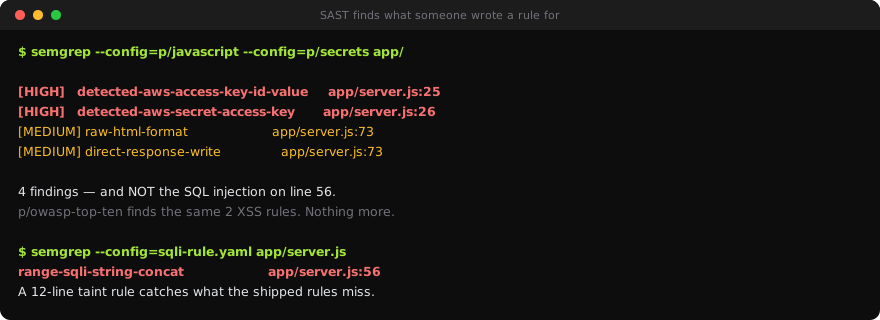
Still only the XSS.
Why it misses. Taint rules are written as sources and sinks. The source here is fine —
req.query.qis a known source. The sink is not: this app usessql.js, so the dangerous call isdb.exec(). No shipped rule listsdb.execas a SQL sink, so the data flow ends nowhere and nothing fires. Swap inmysql.query()orknex.raw()and the same code lights up immediately.
That is the single most useful thing to understand about SAST: it does not find vulnerabilities, it finds patterns someone wrote a rule for. An unusual library, an in-house wrapper, or a helper called runQuery() is enough to make a real bug invisible.
Step 3 — Write the rule that catches it
Semgrep rules are YAML, and taint mode needs only a source and a sink:
# sqli-rule.yaml
rules:
  - id: range-sqli-string-concat
    message: >-
      SQL built by string concatenation from request input, then executed.
      Use a parameterised query.
    severity: ERROR
    languages: [javascript]
    mode: taint
    pattern-sources:
      - pattern: $REQ.query.$PARAM
    pattern-sinks:
- pattern: $DB.exec(...)semgrep --config=sqli-rule.yaml app/server.js custom rule findings: 1
range-sqli-string-concat line 56Twelve lines, and the bug the shipped rules walked past is now a build failure. $REQ, $PARAM and $DB are metavariables — they match any identifier, so this rule holds regardless of what the variables are called.
The lesson generalises. Every codebase has its own sinks: the internal HTTP client, the templating helper, the ORM escape hatch. Adding five rules for your own wrappers will do more for you than any amount of tuning the vendor set.
Step 4 — Gate the pull request
# .github/workflows/sast.yml
name: sast
on: [pull_request]

permissions:
  contents: read

jobs:
  semgrep:
    runs-on: ubuntu-latest
    container:
      image: semgrep/semgrep
    steps:
      - uses: actions/checkout@v4
      - run: semgrep ci --config=p/javascript --config=p/secrets --config=.semgrep/
Two details worth copying.
semgrep ci rather than semgrep scan: on a pull request it diffs against the base branch and reports only newly introduced findings. Point a scanner at an existing codebase and it returns hundreds of issues nobody will read; scoping to the diff makes the gate something a team will actually keep.
--config=.semgrep/ alongside the registry packs, so your own rules run with the vendor ones rather than instead of them.
Step 5 — Triage honestly
Semgrep's nosemgrep comment suppresses a finding on a line:
// nosemgrep: detected-aws-access-key-id-value  -- lab fixture, not a live key
const AWS_ACCESS_KEY_ID = 'AKIA3XZP7QK2WVNR8TLM';
Name the specific rule, never a bare // nosemgrep, and say why. A bare suppression silences every rule on that line forever, including ones written after you left.
What you learned
- Semgrep caught the AWS access key ID that gitleaks ignored. Different tools ship different rules; running one scanner is not coverage.
- The default rules missed a textbook SQL injection because the sink —
db.execfromsql.js— is not in any shipped rule. SAST finds patterns someone wrote a rule for, not vulnerabilities. - A taint rule needs a source and a sink and can be twelve lines. Writing a handful for your own wrappers beats tuning the vendor set.
semgrep cireports only what the pull request introduced. That is the difference between a gate that survives and one that gets disabled in a fortnight.- Suppress by rule id with a reason attached. A bare
nosemgrepdisables rules that do not exist yet.