
Every SAST tool so far has produced a list of findings. SonarQube produces something different and, for a pull request, more useful: a quality gate — a single pass or fail, computed from rules you set, that becomes a check on the PR itself. The findings matter, but the gate is the product.
This lesson wires it up against the Range, reads what it caught and — as with every SAST tool in this track — what it missed.
Verified against SonarCloud and sonar-scanner 8.1.0, analysing the Range
app/. Every number below came from a real analysis.
Step 1 — Cloud or Community, and why it matters for PR checks
SonarQube comes in two shapes, and the choice is decided by the phrase in this lesson's title:
- SonarQube Community — free, self-hosted (a Docker container you run). It analyses code and computes a quality gate. It does not decorate pull requests — no inline comments, no PR status check. That is a paid feature.
- SonarQube Cloud (formerly SonarCloud) and the self-hosted Developer edition — do PR decoration: the gate result is posted as a check on the pull request, and issues appear as inline comments.
So if the goal is PR checks, Community alone does not get you there. Cloud is free for public repositories and is what this lesson uses. Community is the right pick when you want the analysis and gate on a schedule and do not need per-PR decoration — or when the code cannot leave your network.
Step 2 — Point the scanner at your code
Create a project in SonarCloud (or bind your repo via the GitHub App, which also sets up decoration), then run the scanner. It uploads the analysis; SonarCloud computes the results server-side.
brew install sonar-scanner

cd aiopsone-range
sonar-scanner \
  -Dsonar.organization=<your-org> \
  -Dsonar.projectKey=<your-org>_aiopsone-range \
  -Dsonar.sources=app \
  -Dsonar.exclusions='**/node_modules/**' \
  -Dsonar.host.url=https://sonarcloud.io \
  -Dsonar.token=$SONAR_TOKEN
Two flags worth calling out. -Dsonar.sources=app scopes the scan to the application source — point it at the whole repo and it also runs SonarQube's IaC and Dockerfile sensors, which is fine but broadens the lesson. And $SONAR_TOKEN is a user token from My Account → Security; keep it in secrets.SONAR_TOKEN in CI, never in the repo.
Step 3 — What it found
Analysis of 77 lines of app/server.js: 4 vulnerabilities, 0 bugs, 0 code smells, and a security rating of E — the worst grade, because a single Blocker vulnerability caps it there.
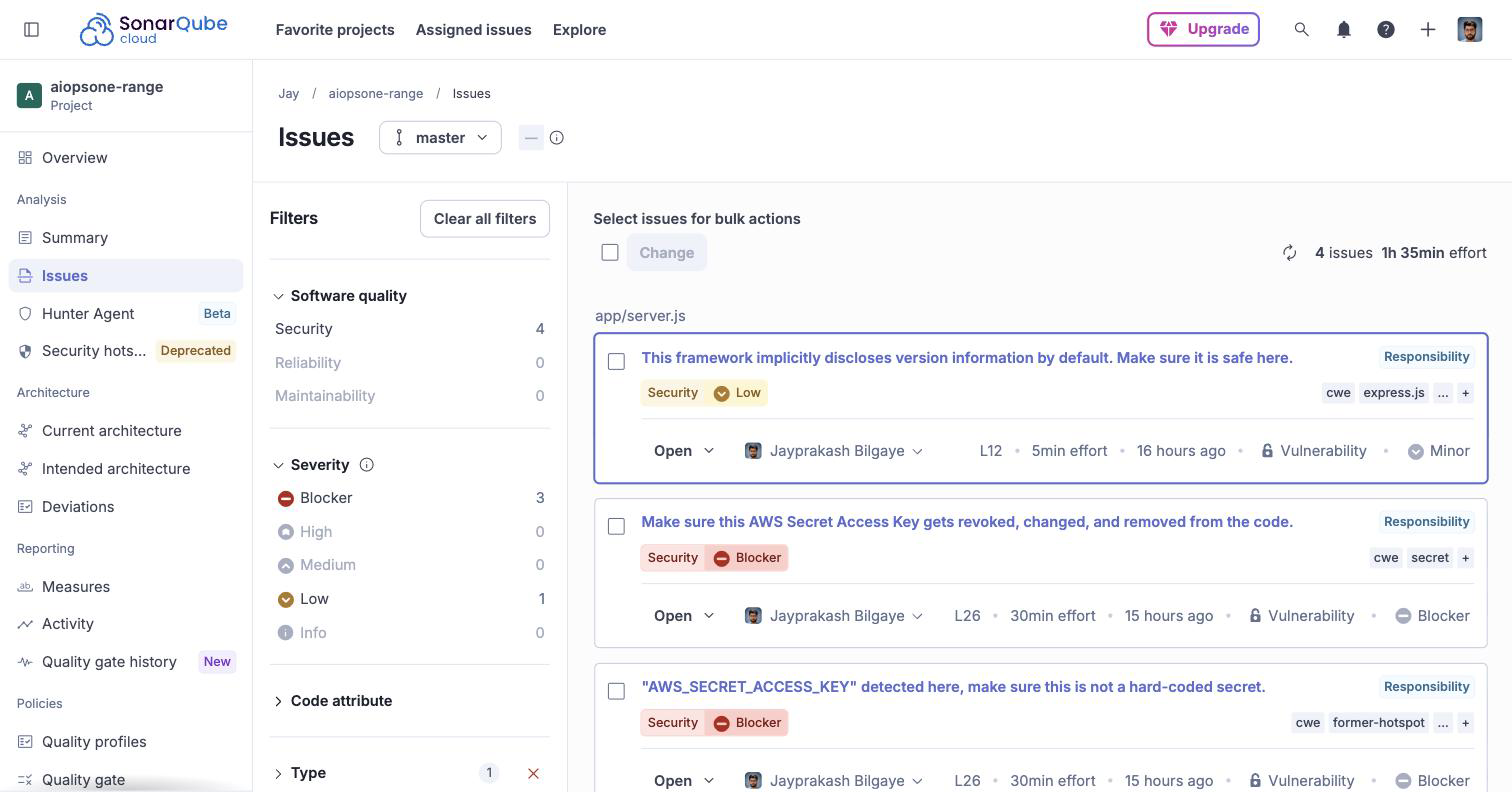
| Line | Severity | Finding |
|---|---|---|
| 73 | Blocker | "Change this code to not reflect user-controlled data" — the reflected XSS |
| 26 | Blocker | Hardcoded AWS Secret Access Key — revoke it (flagged twice: as a secret and as a former hotspot) |
| 12 | Low | Express discloses its version by default (X-Powered-By) |
The XSS and the AWS secret are real and correctly Blocker-rated. The version-disclosure finding is the kind of low-severity hardening note SonarQube is good at surfacing that a pure vulnerability scanner ignores.
Step 4 — What it missed, and where that leaves the count
Look at what is not in that list:
- The SQL injection at line 56. SonarQube did not flag it — the same
sql.jsblind spot that Semgrep and CodeQL both hit. Three static engines, one unmodelled sink, zero alerts. - The line 63 error-handler XSS. CodeQL and Snyk Code caught this second-order flaw; SonarQube, like Semgrep, did not.
hunter2on line 27. Flagged the AWS secret, not the plain password.
That makes SonarQube the fourth static engine in this track, and the picture is now settled:
server.js |
Flaw | Semgrep | CodeQL | SonarQube | Snyk Code |
|---|---|---|---|---|---|
| 56 | SQL injection | no | no | no | yes |
| 63 | XSS via error handler | no | yes | no | yes |
| 73 | Reflected XSS | yes | yes | yes | yes |
| 25–26 | Hardcoded AWS creds | yes | no | yes (secret) | yes |
| 27 | Password hunter2 |
no | no | no | yes |
Only Snyk Code found the SQL injection. Four independent engines, and the one non-obvious injection in the file survives all but the commercial reachability-aware tool. If you take one thing from the SAST chapter, it is that line.
Step 5 — The quality gate is the actual PR check
Findings are half of SonarQube; the quality gate is the half that gates a merge. The default "Sonar way" gate evaluates conditions on new code — the lines your pull request changed — not the whole history:
- No new Blocker or High issues
- Security rating on new code is A (no new vulnerabilities)
- Reliability and maintainability ratings on new code are A
- New code coverage ≥ 80%, duplicated lines < 3%
Evaluating on new code is the design decision that makes SonarQube survivable on a legacy repo. Point it at a decade-old codebase and it will find thousands of issues — but the gate only fails the PR if this change introduces a new one. The backlog is visible but not blocking; the gate protects the trend line. That is the opposite of a scanner that dumps its entire finding list on every run and trains people to ignore it.
On a first analysis the gate reads
NONE, because there is no previous baseline to define "new code" against. It starts gating from the second analysis, or once you set a new-code period. Do not mistake the first run's blank gate for a pass.
Step 6 — Wire it into the pull request
The gate becomes a PR check with one workflow and a stored token:
# .github/workflows/sonarcloud.yml
name: sonarcloud
on:
  push:
    branches: [main]
  pull_request:
    types: [opened, synchronize, reopened]

jobs:
  sonar:
    runs-on: ubuntu-latest
    steps:
      - uses: actions/checkout@v4
        with:
          fetch-depth: 0            # full history — accurate new-code detection

      - name: SonarQube scan
        uses: SonarSource/sonarqube-scan-action@v5
        env:
          SONAR_TOKEN: ${{ secrets.SONAR_TOKEN }}

      - name: Fail on the quality gate
        uses: SonarSource/sonarqube-quality-gate-action@v1
        env:
          SONAR_TOKEN: ${{ secrets.SONAR_TOKEN }}
Two pieces do the work: the scan action runs the analysis, and the quality-gate action blocks the job until SonarCloud finishes computing and then fails it if the gate failed. That failing check is what stops the merge.
fetch-depth: 0is not optional. Without full history SonarQube cannot tell which lines are new, and new-code analysis — the whole point above — degrades.- Full PR decoration (inline comments, the "SonarCloud" check with a summary) requires the repository bound to SonarCloud through its GitHub App. The workflow above runs the analysis and gate for any project; the inline comments appear once the App is installed and the project is bound. That binding is a one-time setup in the SonarCloud UI, and it is what turns a passing/failing job into a rich PR review.
Step 7 — Where SonarQube fits
It is not competing with the injection-finders, and reading it as one sells it short. SonarQube is the broad quality-and-security gate you run on every PR:
- It covers what the others do not — bugs, code smells, maintainability, duplicated code, and test coverage — alongside security. On the Range there were no bugs or smells to find in 77 lines, but on a real codebase that breadth is most of its value.
- Its gate model is built for the PR — new-code conditions, one pass/fail, decoration. That is a better gate than a raw scanner's finding dump, even where the scanner finds more.
- It is not your last line on injection. It missed the SQLi, like two of the other three engines. Run it for the gate and the breadth; keep a tool that models your sinks — a Semgrep rule you wrote or Snyk Code — for the injection it cannot see.
Community for a free self-hosted gate without PR decoration; Cloud (free for public repos) or Developer for the PR checks this lesson is about. Either way, gate on new code, and do not let a green gate on the first analysis fool you into thinking it looked.
What you learned
- SonarQube is a quality gate, not another injection scanner — the gate is what checks the PR.
- Community does not decorate PRs; that needs Cloud (free for public repos) or Developer edition. Pick by whether you need per-PR checks.
- On the Range it found 4 vulnerabilities (XSS at :73, hardcoded AWS secret at :26, version disclosure at :12) and rated the project E.
- It missed the SQL injection at :56 — the same
sql.jsblind spot as Semgrep and CodeQL. Across four static engines, only Snyk Code caught it. - The quality gate evaluates new code, so it is survivable on a legacy repo: the backlog shows but only new issues fail the PR. A first analysis reads
NONE— not a pass. - Wire it with the scan action + quality-gate action and
fetch-depth: 0; full decoration needs the SonarCloud GitHub App binding. - Run it for the gate and the breadth (bugs, smells, coverage, duplications), and keep a sink-aware tool for the injection it does not model.