
Every SAST tool so far has needed you to run it — install a binary, or send code to a service. CodeQL is the one that is already there. If your code is on GitHub, turning on the strongest freely-available static analyser is one workflow file, it runs on every pull request, and the results land in the Security tab next to the code.
That convenience is the reason CodeQL is the default SAST for most open-source projects. This lesson turns it on against the Range, reads exactly what it found — and, more usefully, what it did not.
Verified against CodeQL 2.26.3, running on GitHub Actions against the public Range repo. Every alert below came from the real Security tab.
Step 1 — Turn it on
CodeQL is enabled by committing a workflow. That is the whole setup — no account, no service, no separate dashboard.
# .github/workflows/codeql.yml
name: codeql
on:
  push:
    branches: [main]
  pull_request:
    branches: [main]
  schedule:
    - cron: '0 3 * * 1'      # re-scan weekly against new queries

jobs:
  analyze:
    runs-on: ubuntu-latest
    permissions:
      contents: read
      security-events: write        # required to write to the Security tab
    strategy:
      matrix:
        language: [javascript-typescript]
    steps:
      - uses: actions/checkout@v4
      - uses: github/codeql-action/init@v3
        with:
          languages: ${{ matrix.language }}
          queries: security-extended    # the deeper taint queries
      - uses: github/codeql-action/autobuild@v3
      - uses: github/codeql-action/analyze@v3
security-extendedis the line that matters. The default query set is deliberately conservative to keep false positives low.security-extendedadds the deeper dataflow and taint-tracking queries — and as you will see, even that does not catch everything.security-and-qualityadds maintainability rules on top if you want them.
Cost: free for public repositories and for open source. On a private repo, CodeQL requires GitHub Advanced Security, which is a paid add-on. That single fact decides whether CodeQL is your default or a non-starter, so know it before you plan around it.
Step 2 — What it found
The workflow ran in about sixty seconds on a standard runner, executed 103 queries, and raised three alerts, visible in Security → Code scanning:
Severity   Rule                       Location
────────   ────────────────────────   ─────────────────
high       js/reflected-xss           app/server.js:73
high       js/reflected-xss           app/server.js:63
medium     js/xss-through-exception   app/server.js:63
Line 73 is the reflected XSS — res.send('<h1>Hello, ' + name + '</h1>') — which every tool in this track has caught. Expected.
Line 63 is the interesting one, and CodeQL flagged it twice. Recall from the Snyk Code lesson that line 63 is the error handler:
} catch (err) {
  res.status(500).send('<pre>' + err.message + '\n' + sql + '</pre>');
}
User input reaches the browser through the catch block, via the sql variable — second-order reflection that pattern matching does not see. CodeQL not only caught it, it has a dedicated query for exactly this shape: js/xss-through-exception, described as "Exception text reinterpreted as HTML".
This is corroboration, and it matters. In the Snyk Code lesson, that line 63 finding rested on a single tool. Now a second, independent engine — with a purpose-built query and a completely different analysis approach — has found the identical flaw. Two engines agreeing on a subtle second-order bug is much stronger evidence than either one alone. When you see it, believe it.
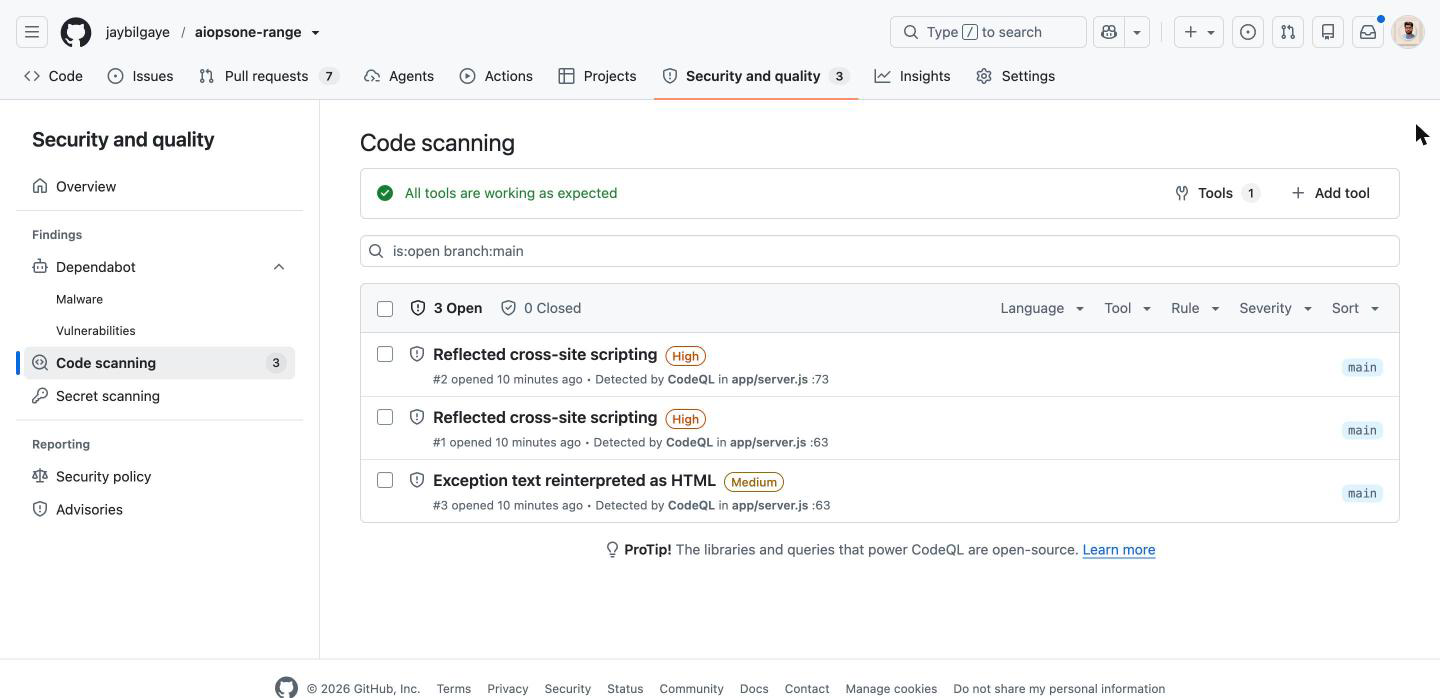
That is the real Security tab: three open alerts, each stamped Detected by CodeQL, each a link to the exact line. This is the "GitHub-native" part — no separate dashboard, the findings sit inside the repository.
Step 3 — What it missed, and why that is the lesson
Three alerts. All three are XSS. Look at what is not in that list:
- The SQL injection at line 56. CodeQL ran
js/sql-injection— it is in the 103 queries — and it did not fire. - The hardcoded AWS credentials at lines 25–26 and the password at line 27.
The SQL injection miss is the important one, because you have seen it before. db.exec(sql) on the Range uses sql.js, and CodeQL's data extractor does not model sql.js's exec() as a SQL sink. No sink, no path, no alert — the exact same root cause that made Semgrep miss it.
Two of the three strongest static engines available, running deep taint analysis, both blind to the same injection — not because their analysis is weak, but because neither ships a model for this particular database library.
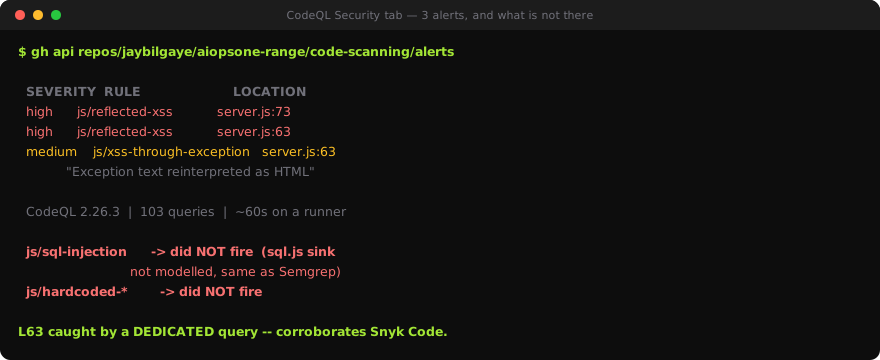
A static analyser is a taint engine plus a library of source and sink models. The engine is world-class in both CodeQL and Semgrep. The coverage is a finite list of modelled functions, and your risk lives exactly where that list ends. The lesson from Semgrep — you cannot find a flow into a sink nobody has modelled — is confirmed here by a completely different tool reaching the identical blind spot.
CodeQL lets you fix this the same way Semgrep does: you can write a custom CodeQL query that adds sql.js exec as a sink. That is real work in a real query language — which is precisely why the Snyk Code result, where the injection was found with nothing configured, was worth paying attention to.
Step 4 — The three-way picture
Same file, three static engines, all run for real:
server.js |
Flaw | Semgrep (auto) | CodeQL | Snyk Code |
|---|---|---|---|---|
| 25–27 | Hardcoded creds / password | AWS keys only | missed | all three |
| 56 | SQL injection | missed | missed | found |
| 63 | XSS via error handler | missed | found | found |
| 73 | Reflected XSS | found | found | found |
| — | Total alerts | 7 | 3 | 9 |
Read it as three different shapes of coverage, not a ranking:
- Only Snyk Code found the SQL injection — it models
sql.js. Neither free engine does. - CodeQL and Snyk Code both found the line 63 XSS; Semgrep missed it. The subtle finding is the one the deeper dataflow engines catch.
- CodeQL reported the fewest alerts (3) and the least noise — no rate-limiting false positives, no hardcoded-credential findings. Conservative, and every alert was real.
CodeQL is not the widest net here. It is the highest-signal, zero-infrastructure one — and on a public repo it is free, which no other engine in this table is at this depth.
Step 5 — What "GitHub-native" actually buys you
The findings are only half the story. The other half is where they show up:
- Pull-request annotations. A new alert comments inline on the exact line of the diff that introduced it, before the code merges. The developer who wrote it sees it in review, not in a report a week later.
- The Security tab as a durable record. Every alert has a state — open, fixed, dismissed with a reason — and a history. This is the audit record that CI logs cannot give you, and for a public project it is free.
- SARIF, so it is not a silo. CodeQL emits standard SARIF. You can upload other tools' SARIF to the same Security tab — Semgrep, Trivy, and others all support it — so the tab becomes one place for every scanner's output.
# upload Semgrep's SARIF into the same Security tab
- run: semgrep scan --config=auto --sarif -o semgrep.sarif
- uses: github/codeql-action/upload-sarif@v3
  with:
    sarif_file: semgrep.sarif
That last pattern is how you resolve the coverage gap from Step 4 in practice: run CodeQL for its native integration and depth, and pipe Semgrep-with-your-custom-SQLi-rule into the same tab. One place, both engines, the sink covered.
Step 6 — Where it fits
If your code is public and on GitHub, CodeQL should be on. It is free, it needs no infrastructure, it runs on every pull request, and it produced three real findings with zero false positives here — including a subtle one two other tools missed.
If your code is private, the GitHub Advanced Security licence is the deciding factor, and for many teams it pushes the decision toward a self-hosted Semgrep, which is free either way.
Either way, the Range proved the ceiling: CodeQL missed the SQL injection because nobody modelled sql.js. The best free engine on the planet still only finds flows into sinks it knows about. Turn it on, read the Security tab, and remember that a clean CodeQL run means "none of the modelled sinks were reached" — not "there are no injection bugs".
What you learned
- CodeQL is enabled with one workflow file — no service, no dashboard. Free for public repos; GitHub Advanced Security for private ones.
security-extendedadds the deep taint queries. It ran 103 queries in ~60 seconds and raised 3 alerts, all real.- It found the line 63 error-handler XSS via a dedicated
js/xss-through-exceptionquery — corroborating Snyk Code with a second independent engine. - It missed the SQL injection at line 56, because it does not model
sql.jsas a sink — the same blind spot as Semgrep. Only Snyk Code, which models it, caught the injection. - A static analyser is an engine plus a finite list of modelled sinks. Your risk lives where that list ends.
- GitHub-native means PR annotations, a durable Security-tab record, and SARIF — and you can upload other tools' SARIF into the same tab.
- Turn it on if you are on public GitHub. Read a clean run as "no modelled sink was reached", not "no bugs".