
Hadolint and trivy config read the Dockerfile. Dockle reads the image — the thing that actually ships.
That difference matters more than it sounds. A Dockerfile is a recipe; the image is the result, including everything the base image brought with it and everything a RUN step left behind. Dockle checks the result against the CIS Docker Benchmark.
Verified against Dockle 0.4.15, against the Range image. Output copied from a real terminal.
Step 1 — Build the image, then scan it
brew install dockle
git clone https://github.com/jaybilgaye/aiopsone-range
cd aiopsone-range

docker build -f docker/Dockerfile -t range-app:vulnerable .
dockle range-app:vulnerable
Note the ordering: this needs a built image. It is the first check in the container chapter that cannot run on a fresh checkout alone, which puts it after the build in any pipeline.
Step 2 — Read the findings by level
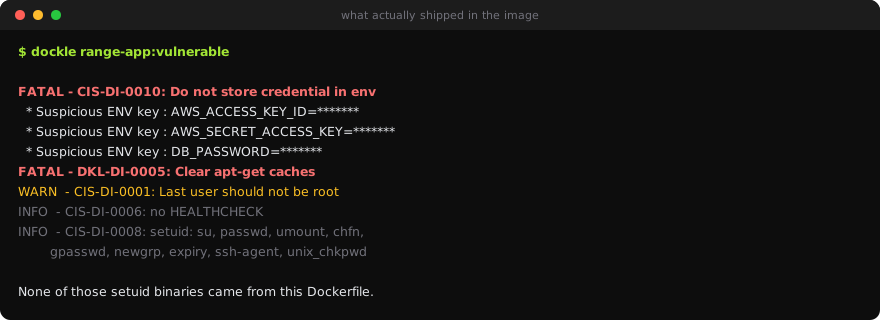
FATAL - CIS-DI-0010: Do not store credential in environment variables/files
    * Suspicious ENV key found : AWS_ACCESS_KEY_ID on ENV AWS_ACCESS_KEY_ID=*******
    * Suspicious ENV key found : AWS_SECRET_ACCESS_KEY on ENV AWS_SECRET_ACCESS_KEY=*******
    * Suspicious ENV key found : DB_PASSWORD on ENV DB_PASSWORD=*******

FATAL - DKL-DI-0005: Clear apt-get caches
    * Use 'rm -rf /var/lib/apt/lists' after 'apt-get install|update'

WARN  - CIS-DI-0001: Create a user for the container
    * Last user should not be root

INFO  - CIS-DI-0005: Enable Content trust for Docker
INFO  - CIS-DI-0006: Add HEALTHCHECK instruction to the container image
INFO  - CIS-DI-0008: Confirm safety of setuid/setgid files
    * setuid file: urwxr-xr-x usr/bin/su
    * setuid file: urwxr-xr-x usr/bin/passwd
    * setuid file: urwxr-xr-x usr/bin/umount
    * setgid file: grwxr-xr-x usr/bin/ssh-agent
    …
CIS-DI-0010 is the one to act on. Dockle masks the values (*******) but names the keys, and those three environment variables are baked into image layers. Anyone who can pull the image can read them — a later unset does not help, because the layer that set them still exists.
CIS-DI-0001 — "Last user should not be root". The wording is precise: Dockle reads the final USER in the image config. A Dockerfile that drops to a non-root user and then switches back for a final step still fails, and correctly so, because the container starts as whatever the last one says.
Step 3 — The setuid inventory nobody asks for
CIS-DI-0008 is the finding that only an image scanner can produce. It lists every setuid and setgid binary in the filesystem: su, passwd, umount, chfn, gpasswd, newgrp, expiry, ssh-agent, unix_chkpwd.
None of those came from this Dockerfile. They came from node:18, which is Debian, which ships a full userland. A setuid binary runs as its owner regardless of who invokes it, so each one is a potential local privilege escalation if it turns out to be vulnerable.
This is the real argument for a distroless or Alpine base, and it is more persuasive than "smaller images". A
node:18image carries a shell, a package manager, and nine setuid binaries the application will never use.gcr.io/distroless/nodejscarries none of them. You cannot exploit a binary that is not in the image.
Dockle marks this INFO rather than FATAL because a base image having setuid binaries is normal. Normal is not the same as necessary.
Step 4 — Gate it
# .github/workflows/container.yml
- name: Build
  run: docker build -f docker/Dockerfile -t app:${{ github.sha }} .

- name: Dockle
  run: |
    docker run --rm \
      -v /var/run/docker.sock:/var/run/docker.sock \
      goodwithtech/dockle:v0.4.15 \
      --exit-code 1 --exit-level fatal \
      app:${{ github.sha }}
--exit-level fatal blocks on FATAL only, so the credential finding and the apt cache fail the build while the setuid inventory and the HEALTHCHECK note report without blocking. Blocking on INFO means blocking on every image that uses a normal base, which is how the check gets removed.
A note if you run Dockle locally on macOS. Dockle may resolve a local image name against Docker Hub and fail with
requested access to the resource is denied. That is it trying to pull rather than read your daemon. Run it in the container above with the socket mounted, or use--inputwith adocker savetarball — though note the tarball for this image is 1.85 GB, so check your disk first.
Step 5 — Fix the two FATALs
# Do not bake credentials. Inject at runtime.
# ENV AWS_ACCESS_KEY_ID=...        <- delete

RUN apt-get update \
    && apt-get install -y --no-install-recommends curl \
    && rm -rf /var/lib/apt/lists/*

RUN useradd --system --create-home --shell /usr/sbin/nologin app
USER app
Re-run Dockle and both FATALs clear. The image still carries 7,696 OS CVEs, because Dockle does not look at packages — that is the next lesson.
What you learned
- Dockle scans the built image, so it sees what shipped rather than what was written.
- Credentials in
ENVare FATAL and survive in the layer regardless of later deletion. Dockle masks the values and names the keys. - "Last user should not be root" is about the final
USERin the image config, not whether one appears somewhere. - The setuid inventory is the argument for a minimal base:
node:18ships nine setuid binaries your app never calls. --exit-level fatal, or you block on every image that uses a normal base.- A clean Dockle run says nothing about vulnerable packages. Different tool, next lesson.