
Scout ships with Docker Desktop. No install, no separate binary, and it runs against an image you have already built.
That convenience is not the interesting part. The interesting part is that it answers a question the other scanners do not: not "how many vulnerabilities", but "how many would go away if you changed one line".
Verified against Docker Scout 1.20.3, against the Range image. Output copied from a real run.
Step 1 — Quickview
git clone https://github.com/jaybilgaye/aiopsone-range
cd aiopsone-range
docker build -f docker/Dockerfile -t range-app:vulnerable .

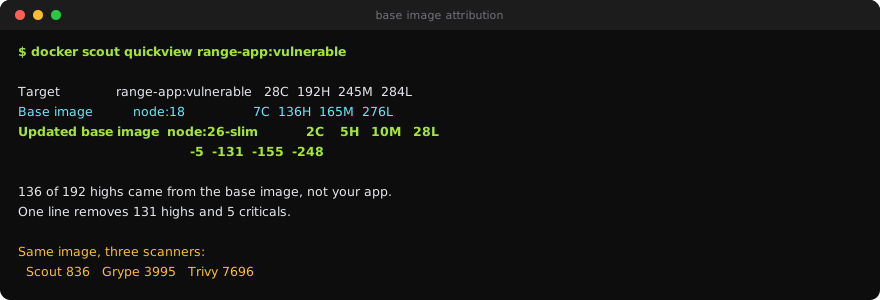
docker scout quickview range-app:vulnerable✓ Indexed 1464 packages
Target │ range-app:vulnerable │ 28C 192H 245M 284L 87?
digest │ b183bb5871b9 │
Base image │ node:18 │ 7C 136H 165M 276L 76?
Updated base image │ node:26-slim │ 2C 5H 10M 28L 5?
│ │ -5 -131 -155 -248 -71Read the bottom row. Moving from node:18 to node:26-slim removes 131 HIGH and 5 CRITICAL findings. One line in the Dockerfile.
Step 2 — The row that makes this useful
The middle row is base image attribution: of the target's 192 HIGH findings, 136 came from node:18 itself. Your application contributed the rest.
Neither Trivy nor Grype reports that split. Both hand you one list where a CVE in libssl from the base image sits next to a CVE in your own dependency, indistinguishable, both needing triage.
The split changes what you do next:
- Base image findings are fixed by changing the base. Not patching, not upgrading a package — one line, and 131 findings disappear because those packages are no longer installed.
- Application findings are yours, and each one is an actual dependency decision.
This is the number to take to a planning meeting. "We have 7,696 vulnerabilities" is unactionable and everyone tunes out. "Changing one line in our Dockerfile removes 131 highs and 5 criticals" is a task with an estimate attached.
Scout also names the specific recommended tag rather than telling you to be more current. node:26-slim is both a supported major and a slim variant, which is two improvements in one substitution.
Step 3 — Now compare the three scanners
Same image, same afternoon, three tools:
| Critical | High | Total | |
|---|---|---|---|
| Trivy 0.72.0 | 229 | 1,622 | 7,696 |
| Grype 0.117.0 | 267 | 1,167 | 3,995 |
| Docker Scout 1.20.3 | 28 | 192 | 836 |
Scout reports roughly a ninth of Trivy's total.
That is not Scout being weak. It indexed 1,464 packages and applies its own matching and severity policy — it is more conservative about what counts as an applicable vulnerability for the image as built. Trivy is the most inclusive of the three.
The Grype versus Trivy lesson argued that a raw CVE count is a fact about your scanner rather than your image. Three tools spanning 836 to 7,696 on identical input settles it. Never put a raw count in a report, an SLA or a board slide without naming the tool and the date.
Step 4 — Drill into the findings
docker scout cves range-app:vulnerable --only-severity critical
docker scout recommendations range-app:vulnerable
recommendations is the one worth running. It lists candidate base images with the findings each would remove, so the choice is a comparison rather than a guess.
Step 5 — The provenance note
Scout printed this:
i Base image was auto-detected. To get more accurate results, build images with
  max-mode provenance attestations.
It inferred the base image from layer digests. That usually works and can be wrong — a squashed or re-tagged image loses the trail.
Building with provenance records it as a signed attestation instead:
docker buildx build \
  --provenance=mode=max \
  --sbom=true \
  -f docker/Dockerfile -t range-app:vulnerable .
That is the same SLSA provenance the supply-chain lessons cover, and this is a good reason to turn it on early: it makes your scanner's base-image attribution a fact rather than a guess.
Step 6 — Where Scout does not fit
It is Docker's ecosystem. Comparisons against registry data and some policy features expect a Docker Hub account and, past the free tier, a paid plan. Trivy and Grype have no such coupling, which matters if your images live in ECR and your CI does not authenticate to Docker.
Its conservatism cuts both ways. 836 findings against Trivy's 7,696 is a far more approachable list — and if your compliance obligation is "scan against a comprehensive database", the most inclusive tool is the defensible choice.
Use it for what it is uniquely good at: the base-image split and the quantified upgrade path. Run it locally before you push, act on the recommendation, and let a more inclusive scanner hold the gate.
Step 7 — Clean up
docker rm -f range-dast 2>/dev/null
docker rmi range-app:vulnerable      # 1.85 GB
What you learned
- Scout ships with Docker Desktop — no install, and it runs on an image you already built.
- It attributes findings to the base image: 136 of 192 highs came from
node:18, not from the application. - It names a specific replacement and quantifies it:
node:26-slimremoves 131 highs and 5 criticals. That is a task with an estimate, not a wall of CVEs. - 836 vs 3,995 vs 7,696 across Scout, Grype and Trivy on identical input. A raw count without a tool name and a date is meaningless.
- Build with
--provenance=mode=maxso base-image attribution is attested rather than inferred. - Best used locally for remediation guidance; gate with a more inclusive scanner.