
The capstone wired all six gates into one workflow. That is the right shape for a single application repo where one team owns everything.
It is the wrong shape for most of an organisation. Infrastructure is usually owned by a platform team, changes on a different cadence than application code, and frequently lives in repos that ship no application at all — a Terraform module, a landing-zone repo, an account factory. Running an app-security monolith on those repos is noise; running nothing is negligence.
The answer is a focused, reusable IaC workflow: it does one thing, it only runs when Terraform actually changes, and any repo can call it in one line. This lesson builds it and runs it against the Range.
Verified. A real GitHub Actions workflow on the public Range repo; the run below is real.
Step 1 — One concern, three jobs
.github/workflows/iac-security.yml:
name: iac-security

on:
  push:
    paths: ['**.tf', '.github/workflows/iac-security.yml']
  pull_request:
    paths: ['**.tf']
  workflow_call:        # ← other repos invoke this
  workflow_dispatch:

permissions:
  contents: read

jobs:
  terraform:      # fmt + validate — syntax and style, no security opinion
  checkov:        # the gate — broadest ruleset
  trivy-config:   # second opinion — different severity model
Two lines in that on: block do the heavy lifting, and both are the point of the lesson.
Step 2 — Path filters: don't run on work you don't cover
on:
  push:
    paths: ['**.tf', ...]
This workflow only runs when a .tf file changes. A commit that touches only application code does not start it, and a commit that only edits Terraform does not start the container scan. That is not a minor optimisation — it is what keeps a busy repo's Actions tab readable and its queue short.
The monolith cannot do this. Because it is one workflow covering everything, it runs on every push regardless of what changed, and every job spins up whether or not its input moved. Splitting by concern is what lets you filter by concern.
The .github/workflows/iac-security.yml entry in the path list is a small trick worth knowing: it means the workflow also runs when you edit the workflow itself, so you can test a change to it without touching Terraform.
Step 3 — workflow_call: write it once, call it everywhere
on:
  workflow_call:
That one line turns this file into a reusable workflow. Any other repo in the organisation invokes the whole thing with a single job:
# .github/workflows/security.yml in some *other* Terraform repo
jobs:
  iac:
    uses: your-org/security-workflows/.github/workflows/iac-security.yml@main
Now forty Terraform repos share one definition of "what IaC security means here". When you add a rule, tighten a threshold, or upgrade Checkov, you change it in one place and every caller inherits it on their next run. Forty copy-pasted workflows drift; one reusable workflow does not.
This is the same argument the enterprise SAST lesson made about central policy — except you get the mechanism free, built into GitHub Actions, no platform licence required.
Step 4 — The jobs
  terraform:
    steps:
      - uses: actions/checkout@v4
      - uses: hashicorp/setup-terraform@v3
      - run: terraform -chdir=terraform fmt -check -recursive
        continue-on-error: true          # style — reports, does not block
      - run: |
          terraform -chdir=terraform init -backend=false -no-color
          terraform -chdir=terraform validate -no-color

  checkov:
    steps:
      - uses: actions/checkout@v4
      - uses: bridgecrewio/checkov-action@v12
        with: { directory: terraform/, soft_fail: false }

  trivy-config:
    steps:
      - uses: actions/checkout@v4
      - uses: aquasecurity/trivy-action@0.28.0
        with: { scan-type: config, scan-ref: terraform/, severity: HIGH,CRITICAL, exit-code: 1 }
The tool choices are the ones the IaC chapter earned: Checkov owns the gate because it caught the wildcard IAM policy Trivy has no rule for, and trivy config runs as a non-blocking second opinion. terraform validate is there for a reason that becomes the run's punchline.
Step 5 — The run
OVERALL: Failure  (26s)

  ✅ terraform fmt + validate      12s
  ❌ Checkov (gate)                22s
  ❌ Trivy config (second opinion)  2s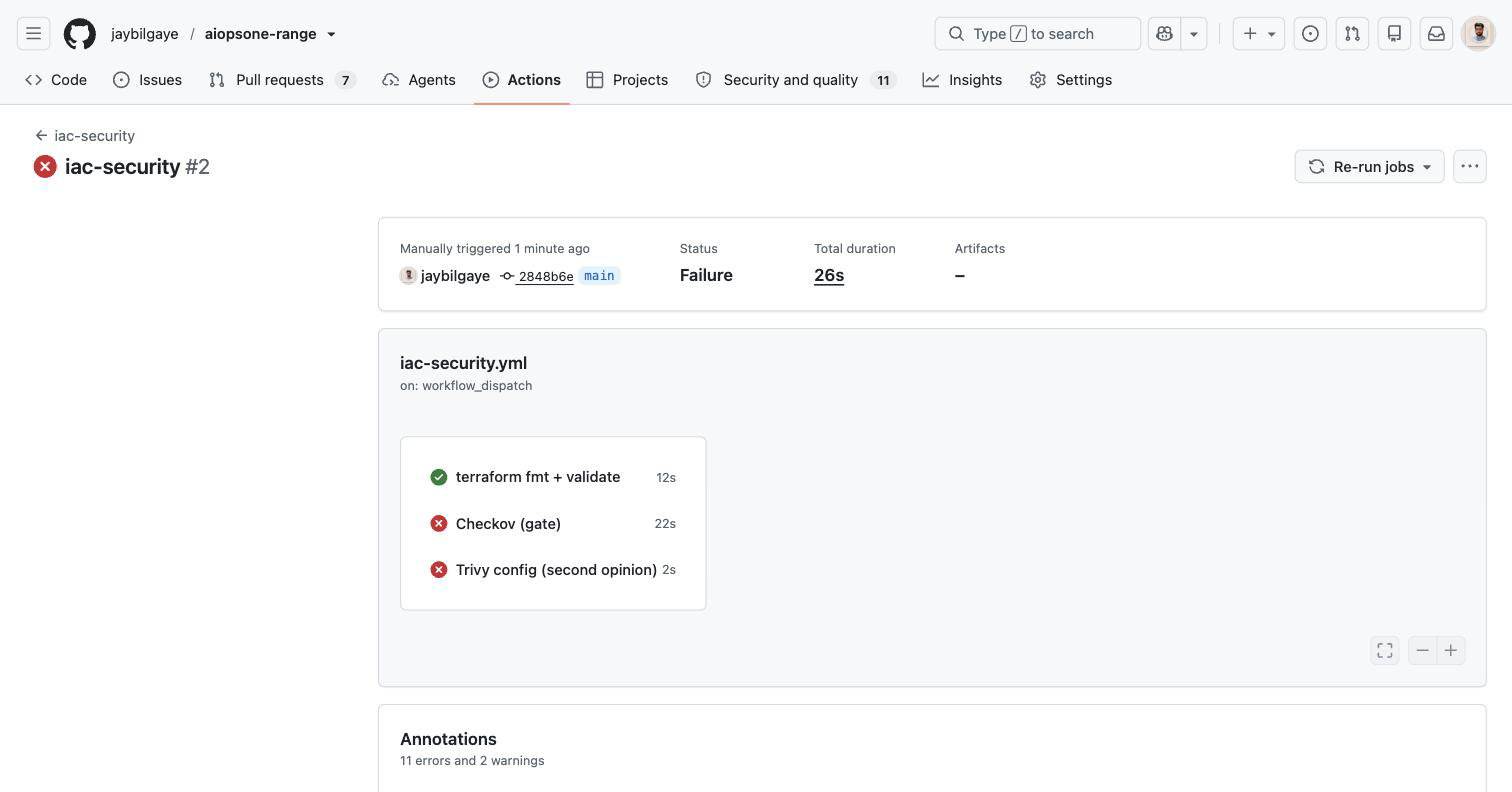
Twenty-six seconds, no image build, no application — a lean workflow doing one job. And the result carries the IaC chapter's sharpest point:
terraform fmt + validate is green. The Terraform is well-formatted and syntactically valid — validate printed "Success! The configuration is valid." On infrastructure that declares a public S3 bucket, an IAM policy with Action: "*" on Resource: "*", and a security group open to the internet. Valid and secure are different questions, and validate only answers the first. A pipeline that runs only terraform validate — and plenty do — is a green check that means nothing about your security posture.
Checkov and Trivy config are red, which is the workflow earning its place: Checkov's 26 findings and Trivy's 11 are what "valid" left on the table. The run's annotations show 11 errors from the Trivy job alone.
That contrast — one green syntax gate, two red security gates, on the identical files — is the whole reason IaC security is its own discipline and deserves its own workflow.
Valid is not secure, the same way green is not safe. In the capstone it was a passive DAST scan and a diff-scoped secrets gate. Here it is
terraform validate. Every pipeline has a green check that is narrower than it looks; knowing which is the difference between running a pipeline and trusting one.
Step 6 — When to split, and when not to
This is not "always split." It is a real trade-off:
Reach for a standalone reusable workflow when:
- Many repos need the same checks (the reuse pays for itself immediately).
- Different teams own different concerns (infra vs app), and each wants its own required check and its own CODEOWNERS.
- Concerns change on different cadences — you tighten IaC rules without re-testing the whole app pipeline.
- A repo has only one concern (a Terraform module repo needs IaC security, nothing else).
Keep the monolith when:
- It is one application repo, one team, one cadence. The capstone's single workflow is simpler to read and reason about, and you are not paying the coordination cost of several files.
The honest rule: one repo, one team → monolith; many repos or many owners → reusable workflows. Most organisations end up with both — a monolith for the flagship app, and a library of reusable workflows for everything else.
What you learned
- The capstone's all-in-one is right for one app repo; infrastructure usually wants its own workflow — different owners, cadence, and repos that ship no app.
- Path filters (
paths: ['**.tf']) run the workflow only when Terraform changes — something a monolith structurally cannot do. workflow_callmakes it a reusable workflow: define IaC security once, invoke it from every Terraform repo in one line, update it in one place.- The gate is Checkov, with
trivy configas a non-blocking second opinion — the choices the IaC chapter measured. terraform validatepassing is not a security result — it is green on infrastructure the scanners flag hard. Valid is not secure, the same way green is not safe.- One repo, one team → monolith. Many repos or owners → reusable workflows. Most orgs run both.