
Every other tool in the DAST chapter runs itself. ZAP spiders and attacks on a schedule; Nuclei fires templates in seconds. Both belong in CI because both run headless with no human in the loop.
Burp Suite is the most widely used web security tool on the planet, and the honest headline of this lesson is that the Community edition cannot go in your pipeline at all — and that trying to force it there is the wrong instinct. Burp is a different kind of tool, and knowing which kind is the actual lesson.
Verified against Burp Suite Community Edition 2026.7.3, driving the Range app. Every request below was replayed through a live Burp proxy.
Step 1 — The limitation, stated plainly
Open Burp Community and the project dialog tells you everything:
○ Temporary project in memory
🔒 New project on disk — Project files are Burp Suite Professional only
Community cannot save a project. It runs in memory only, and it closes with the window.
That single fact is why it cannot be automated. Burp's headless mode — the way you would run it in CI — is invoked like this:
# This is the Professional automation entry point. It does not exist in Community.
BurpSuitePro --project-file=ci.burp \
             --config-file=scan.json \
             --unpause-spider-and-scanner
Every one of those flags requires a project file, and project files are Professional only. There is no --headless, no burpsuite.jar --help that prints a CLI, and no scan API on the Community tier. I confirmed it directly: launching burpsuite.jar with -Djava.awt.headless=true produces no output and never returns — it is a desktop application with no command-line contract.
This is not a workaround problem. You cannot script your way around it, and you should not try. Burp Community is a manual, interactive, GUI tool, by design. The pipeline slot in this chapter is already filled by ZAP, which is free, headless, and built for exactly that. Reaching for Burp there is using a scalpel where you wanted a conveyor belt.
Step 2 — So what is it actually for
Burp is what you open after a scanner finds something and you need to understand it.
ZAP told you /search?q=' returned a 500 and inferred SQL injection. That is a finding. It is not yet understanding — you do not know how far the injection goes, what it can read, or whether the fix worked. Answering that means sending crafted requests by hand and reading the exact responses, and that is precisely what Burp is built for.
The workflow is: proxy → capture → repeat → modify → observe. No automation, full control.
Step 3 — Point your traffic through it
Start the Range and confirm Burp's proxy is listening:
git clone https://github.com/jaybilgaye/aiopsone-range
cd aiopsone-range
docker build -f docker/Dockerfile -t range-app:vulnerable .
docker run -d --name range-burp -p 127.0.0.1:3100:3000 range-app:vulnerable

# Burp Community's default proxy
lsof -nP -iTCP:8080 -sTCP:LISTENJavaAppli 74442 jay 21u IPv6 TCP 127.0.0.1:8080 (LISTEN)Burp listens on 127.0.0.1:8080 by default. You can drive a browser through it, but for a demo the cleanest way to show the proxy working is to send traffic straight at it and watch it land in Burp's HTTP history tab:
curl -x http://127.0.0.1:8080 "http://127.0.0.1:3100/search?q=laptop"That request now appears in Proxy → HTTP history, and Burp's Dashboard builds a live site map from everything the proxy sees. After sending the Range's key requests through it, the dashboard catalogues them automatically:
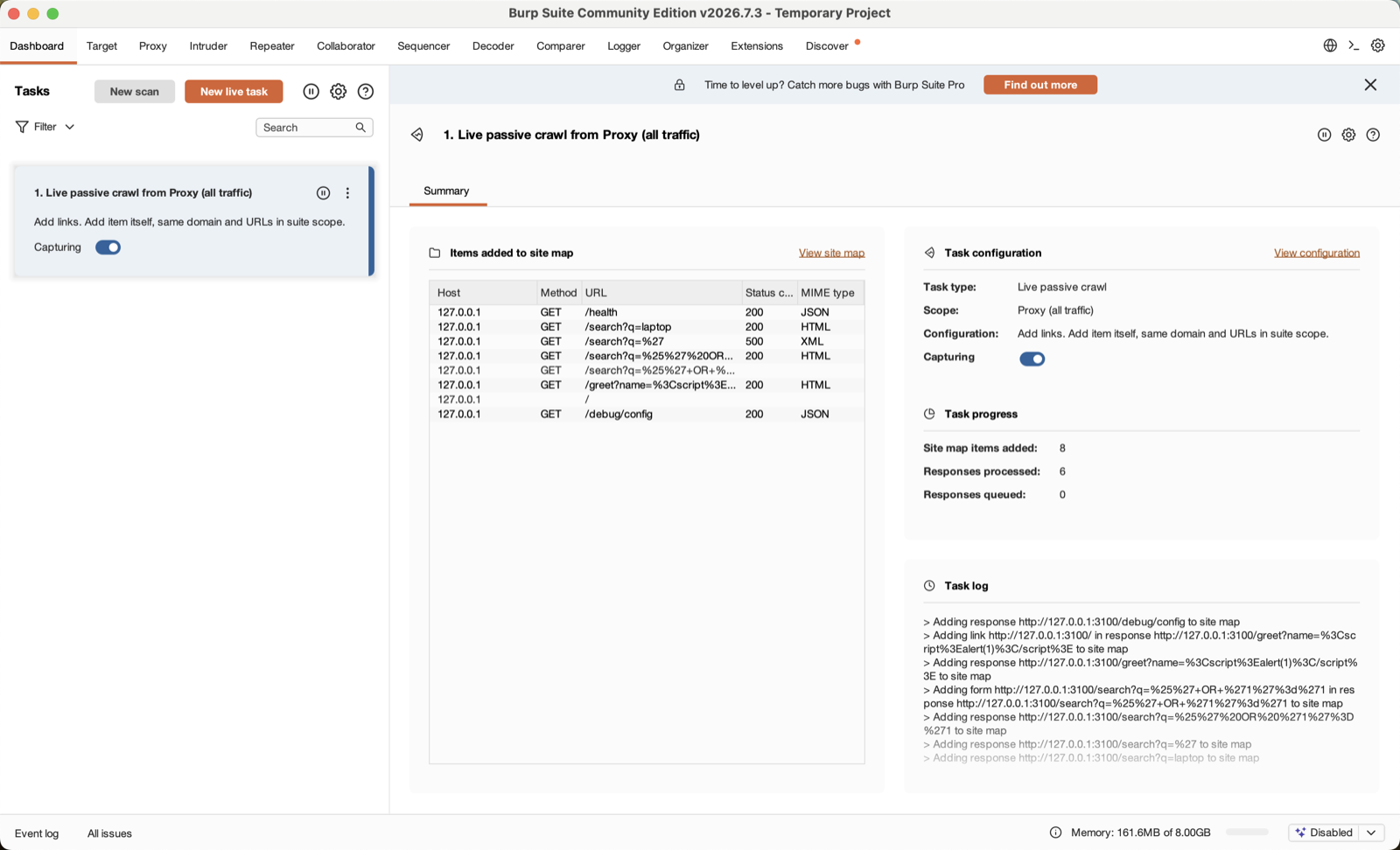
Read the site map. Six requests, each with its status code — and /search?q=%27 is recorded as a 500, exactly the probe that leaks the SQL statement. The title bar says Temporary Project (Community cannot save one), and the banner across the top — "Time to level up? Catch more bugs with Burp Suite Pro" — is the boundary this whole lesson is about. Everything here is manual and in-memory; nothing here is a pipeline.
Every request and response is retained in full for the session. That history is the raw material for everything else.
A note on intercept. Burp's Proxy has an Intercept toggle. When it is on, every request pauses until you click Forward — useful for editing a request in flight, and a complete roadblock if you forget it is on and your
curlhangs. Community starts with intercept off, which is why the command above returns immediately. If a request ever hangs through the proxy, check that toggle first.
Step 4 — Repeater: the one feature to learn
Right-click the /search request in HTTP history and Send to Repeater. Repeater is Burp's defining tool: it holds one request, lets you edit any part of it, and resends it on demand. This is where you turn a scanner's "something is wrong here" into "here is exactly what is wrong, and here is proof".
Change the query to a single quote and send:
GET /search?q=%27 HTTP/1.1
Host: 127.0.0.1:3100
The response comes back 500, and the body contains:
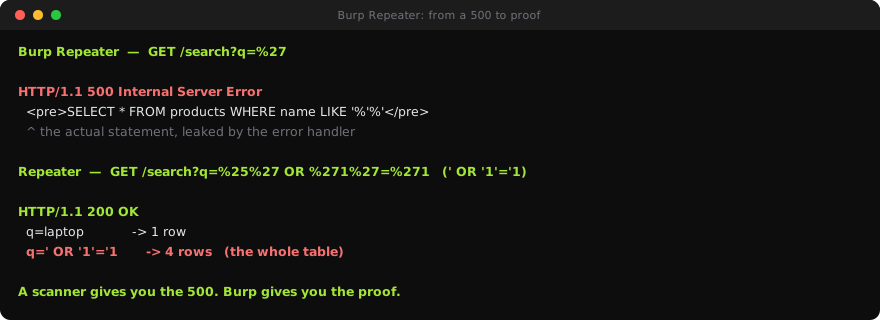
SELECT * FROM products WHERE name LIKE '%'%'There it is — not an inference, the actual SQL statement, leaked by the Range's verbose error handler. Burp shows you the whole response, so you read the query the database tried to run. That is a level of detail a pass/fail scanner never gives you.
Now confirm it is exploitable, not just erroring. Change the query to a classic tautology and send again:
GET /search?q=%25%27%20OR%20%271%27%3D%271 HTTP/1.1That is %' OR '1'='1 URL-encoded. Compare the two responses in Repeater side by side:
| Request | Rows returned |
|---|---|
q=laptop |
1 |
q=%' OR '1'='1 |
4 |
The injection returns the entire products table, not the one row a search for "laptop" should. That table is the difference between "the scanner saw a 500" and "I have demonstrated data exfiltration". You cannot put that comparison in a CI gate — but you can put it in a bug report that a developer cannot argue with.
Step 5 — The other two flaws, by hand
The same repeat-and-observe loop confirms the rest of the Range in seconds each. Send these from Repeater or straight through the proxy:
# Reflected XSS — the payload comes back unescaped
curl -x http://127.0.0.1:8080 \
  "http://127.0.0.1:3100/greet?name=%3Cscript%3Ealert(1)%3C/script%3E"
#   ...response body contains: <script>alert(1)</script>

# The unauthenticated debug endpoint
curl -x http://127.0.0.1:8080 "http://127.0.0.1:3100/debug/config"
#   {"awsAccessKeyId":"AKIA3XZP7QK2WVNR8TLM","dbPassword":"hunter2", ... }
Notice what happened: you found all three flaws because you already knew where they were. Burp did not discover them — you did, in earlier lessons, with other tools. Burp let you investigate and prove them. That division of labour is the whole point.
Where Burp Professional would change this. The Professional scanner would crawl and attack automatically, like ZAP but with a stronger engine and a project file you can automate. That is a real product worth its price for a working pentester. It is not free, and it is not what you gate a pull request with — you would still run ZAP in CI and Burp Pro in a human's hands.
Step 6 — What belongs in CI, and what does not
Put the DAST chapter's tools in their lanes:
| Runs in CI | Discovers | Best at | |
|---|---|---|---|
| ZAP baseline | yes — every PR | spiders | fast passive gate |
| ZAP full | yes — scheduled | spiders | automated attack |
| Nuclei | yes — every PR | you supply paths | known-issue checks, fast |
| Burp Community | no | you, manually | investigating a finding |
Burp Community is not a CI tool and never becomes one. It is the tool a human opens when a gate goes red and someone has to understand why. That is a genuine, permanent role — it is simply not an automated one.
The mistake this lesson exists to prevent is spending an afternoon trying to headless-automate Burp Community for your pipeline. It cannot be done, the ceiling is a Professional licence, and even then the pipeline job is still ZAP's. Use each tool for the job it is shaped for.
Step 7 — Clean up
docker rm -f range-burpAnd close Burp — the temporary project evaporates with it, which for a deliberately vulnerable target is a feature, not a loss.
What you learned
- Burp Community cannot run in a pipeline. Its automation needs a project file, and project files are Professional only. There is no CLI and no headless mode — verified directly.
- That is not a limitation to work around. Burp is a manual, interactive tool by design; the CI slot is ZAP's.
- It is what you open after a scanner finds something, to investigate and prove it.
- Repeater is the feature to learn: hold one request, edit it, resend, compare responses.
- On the Range, Repeater leaked the actual SQL statement (
SELECT * FROM products WHERE name LIKE '%'%') and proved exploitation — 4 rows for' OR '1'='1versus 1 for a normal search. A scanner gives you the 500; Burp gives you the proof. - Start with Intercept off (Community's default). If a proxied request hangs, that toggle is why.
- Right tool, right lane: ZAP and Nuclei gate the pipeline; Burp sits in a human's hands for the finding that needs a person.